Hotels: Save up to 10% (Book online or on Mobile)
Homes & Apts: Save up to £39 (App-only deal)

By Trip.com
February 10, 2026
Travelling can be stressful, from long flights to crowded terminals, but getting from the airport to your hotel shouldn’t be. With Trip.com Airport Transfer, travellers can enjoy a smooth, safe, and reliable connection between the airport and their destination.
Covering more than 600 airports globally, Trip.com offers travellers a fast, safe and cashless transfer experience, perfect for families, business travellers or solo adventurers.
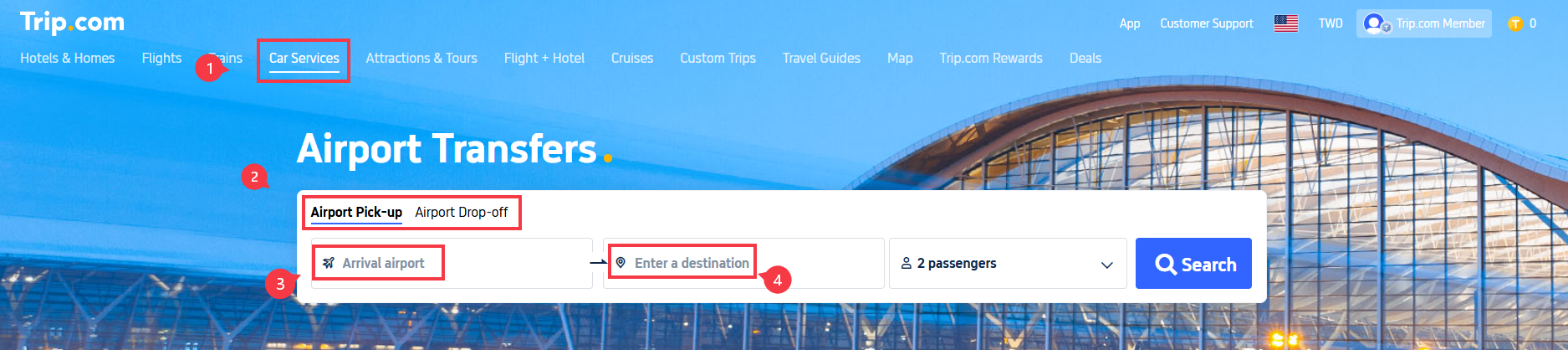
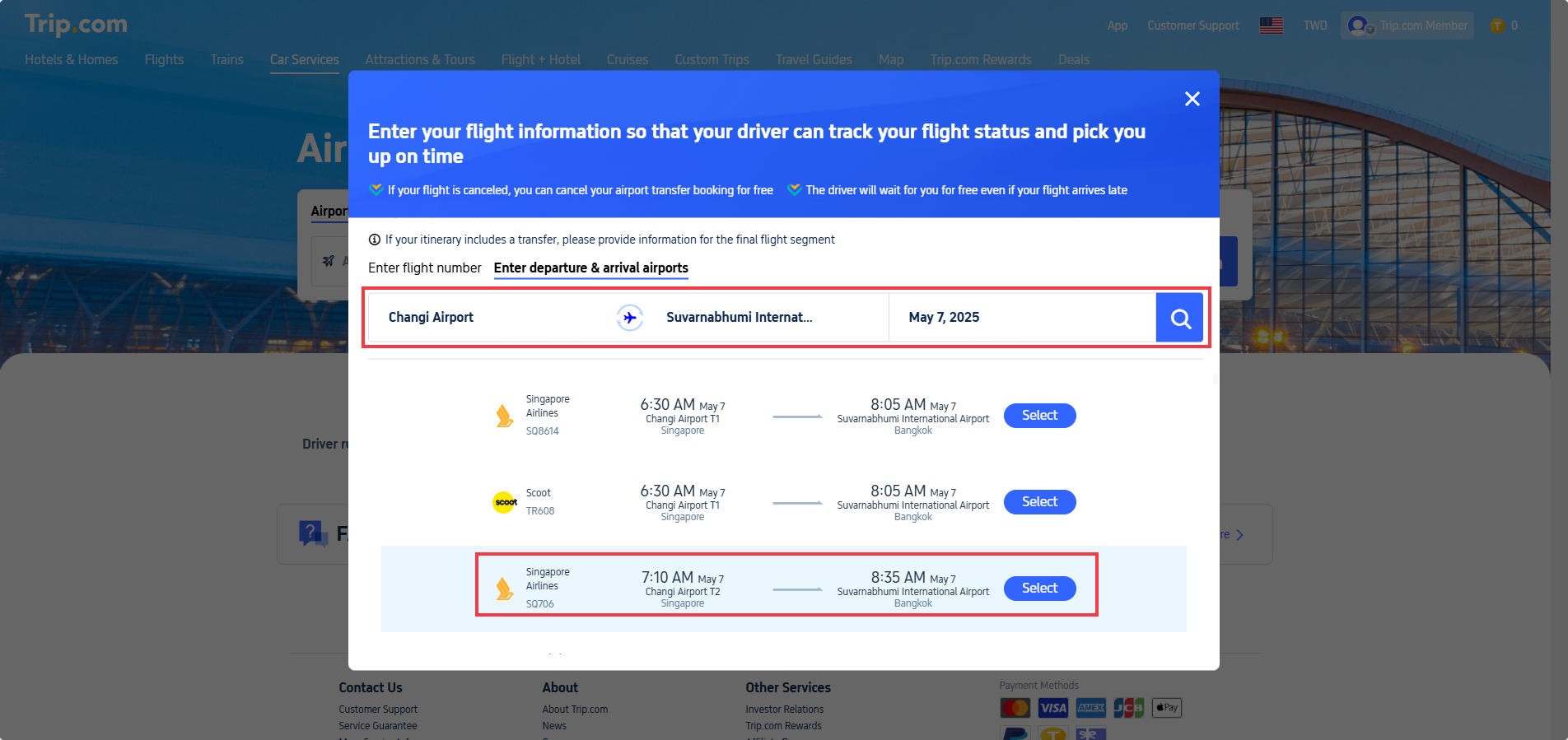
For your airport pick-up (arrival):
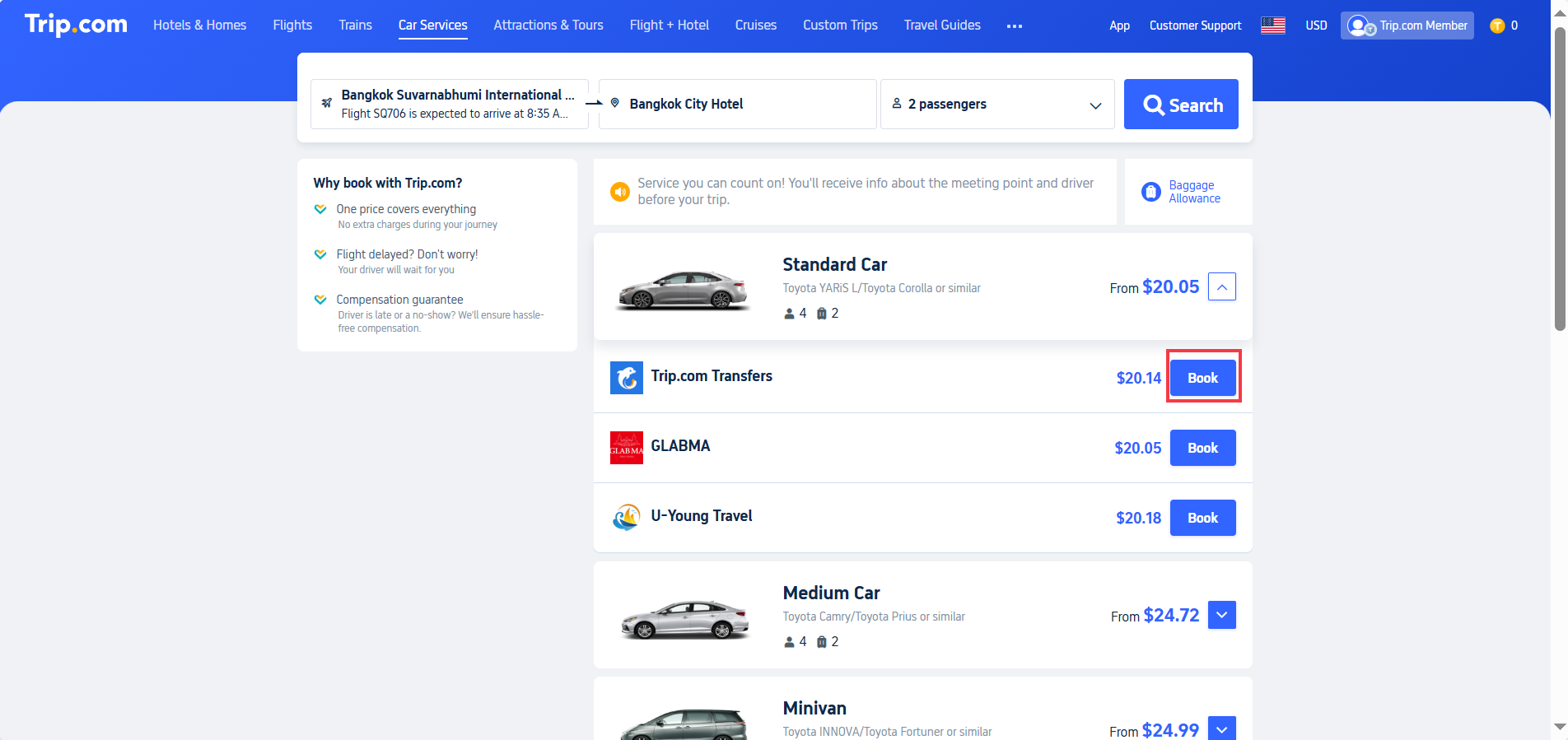
Review the booking details on the final page:

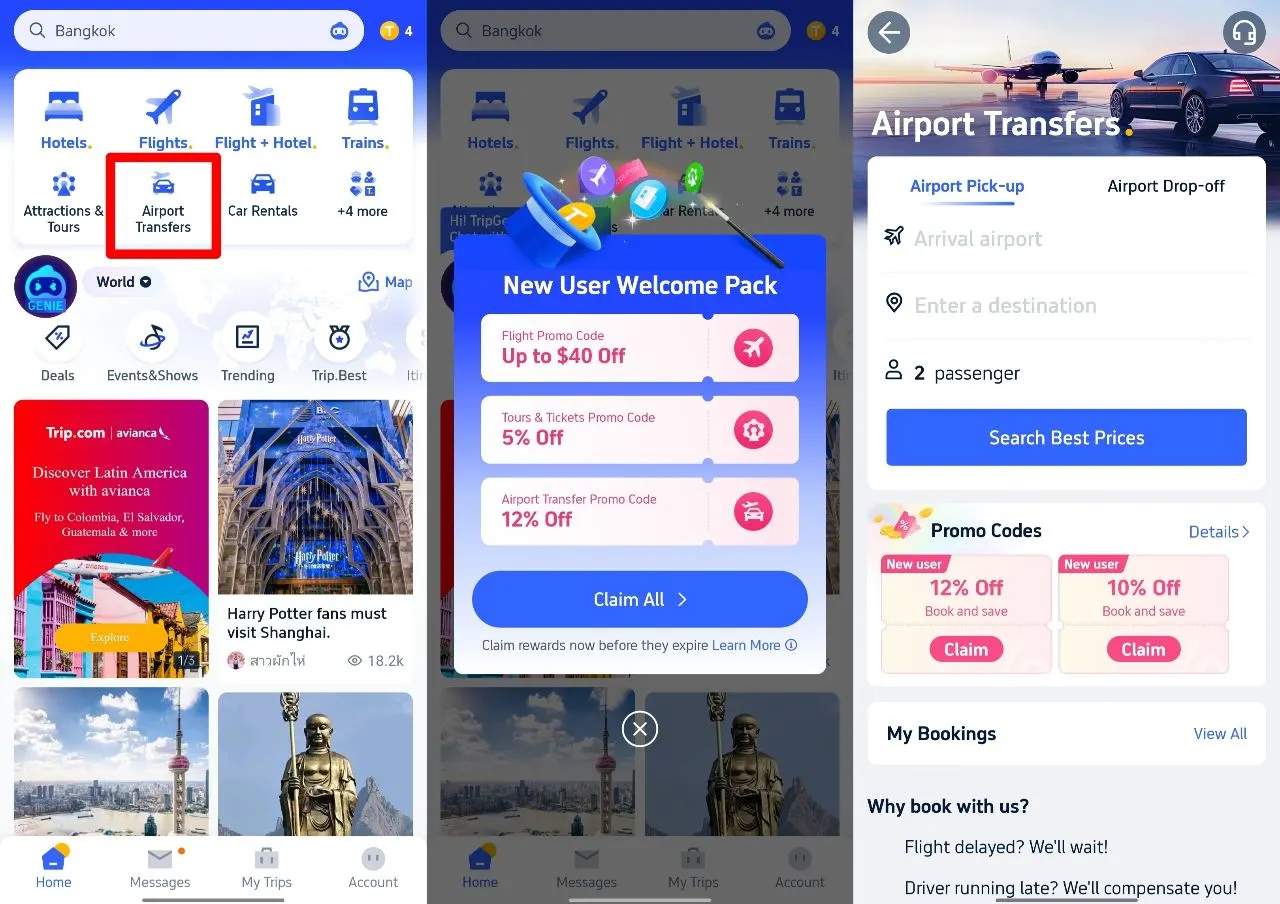
Step 1: Download the Trip.com app and select 'airport transfer'
Step 2: Claim your airport transfer promo code
Step 3: Once you've chosen the right car, enter your promo code on the payment page.

Feature | Details |
Global Coverage | Available at over 600 airports across Asia, Europe, and beyond. |
Vehicle Options | Choose from Economy, Business, MPV, or Luxury vehicles to suit your travel style. |
Meet and Greet | Your driver will be waiting for you with a name sign, right in the arrivals area. |
Transparent Pricing | No hidden costs or surge pricing – all fares are shown upfront. |
24/7 Customer Support | Trip.com offers live chat and multilingual help at any time. |
Flight Monitoring | Drivers track flight delays for timely pick-ups. |

Prices vary depending on the location and vehicle type, but are generally cheaper than hotel-arranged transfers and more reliable than local taxis.
Vehicle Type | Ideal For | Approx. Price (GBP)* |
Economy Car | 1–2 passengers | £25–£60 |
MPV / People Carrier | Families or small groups | £50–£100 |
Business / Premium | Executive or VIP travel | £80–£150 |
*Prices are approximate and may vary depending on the provider or season.

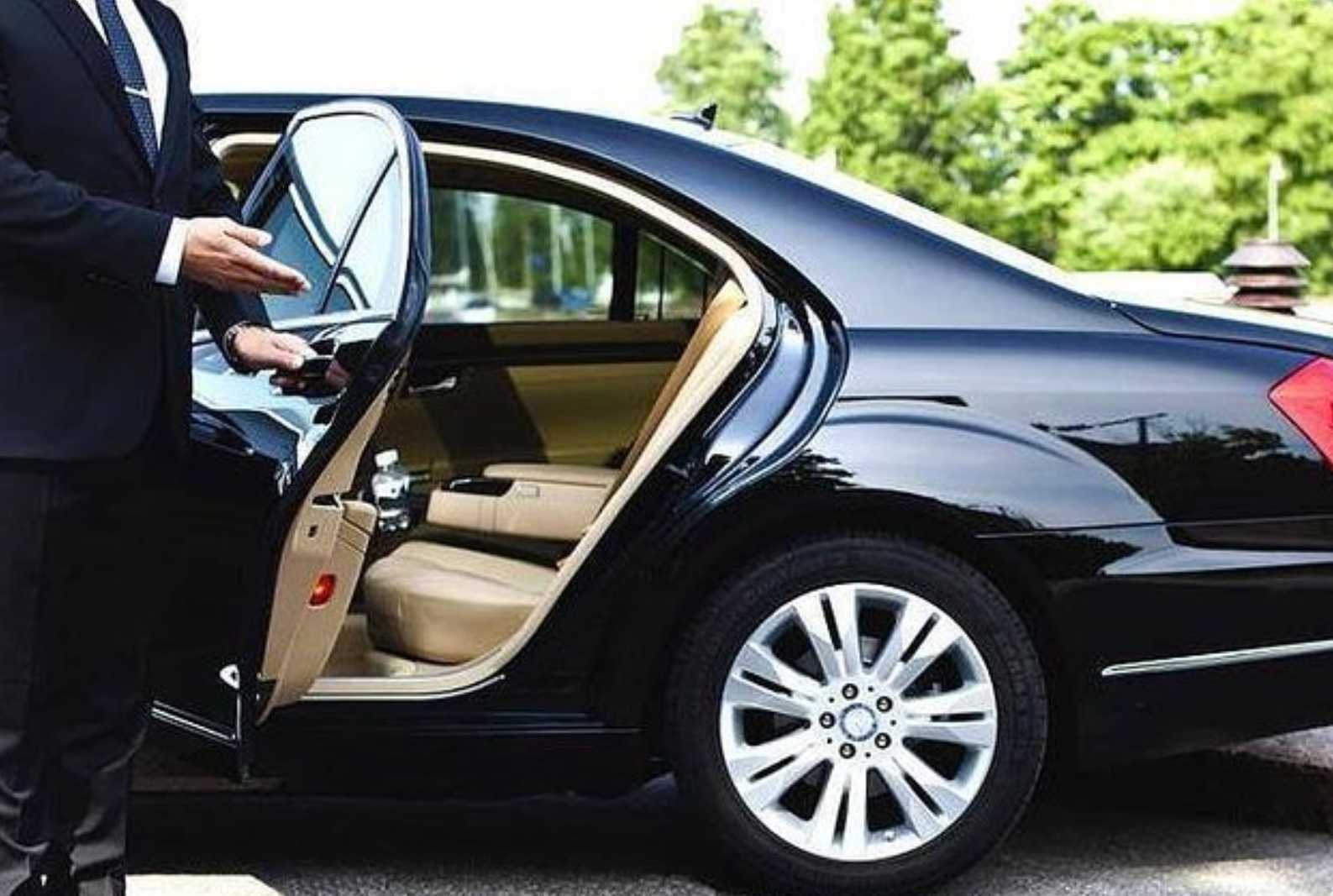
Receive your driver's contact details and number plate via email or the app 24 hours before pick-up.
Call Trip.com’s 24/7 support for instant assistance.

Travellers around the world have rated Trip.com Airport Transfer as one of the most convenient and trustworthy ways to reach their destination.
What Real Travellers Say
Factor | Trip.com Airport Transfer | Traditional Taxi | Ride-Hailing Apps (Grab, etc.) |
Pricing / Cost | Fixed price booked in advance; no surprises | Metered or fixed airport fare; can vary with traffic and tolls | Price estimate shown in app, but surge or traffic can increase cost |
Convenience & Comfort | High – pre-booked, driver meets you, helps with luggage, options including premium | Medium – hail or queue; comfort varies, luggage space not guaranteed | High – book via app, choose vehicle size; flexible if drivers available |
Availability | Best booked in advance; widely available at major airports | Usually always available at main airports; queues possible | Good in cities and popular areas; fewer cars during peak or bad weather |
Speed & Waiting Time | Pre-booked, driver ready on arrival; minimal waiting | May need to queue at taxi rank; delays possible | Matched with nearest driver; app shows ETA, but occasional delays |
Information Transparency | Driver details, vehicle type, fixed price, flight tracking | Less info upfront; pay meter/fixed fare; driver details limited | Fare estimate, driver rating, vehicle type, and number plate visible in app |
Flight Delays | Driver tracks your flight automatically | May incur waiting fees if delayed | Might need to request a new ride; surge or availability can change |
Best For | Holidaymakers, families, late-night arrivals – stress-free | Quick pick-up if on time, light luggage, familiar with local taxis | Flexible, last-minute rides, or when taxis are unavailable; cost comparison possible |
Potential Drawbacks | Can be more expensive than taxi; limited route changes; premium extra | Possible overcharging; comfort not guaranteed | Surge pricing, cancellation fees, driver delays, price changes during peak/bad weather |
Route | Duration | Cost (GBP) | Notes |
London Heathrow / Gatwick → Central London | ~60 mins | £60–£100 | Fixed-rate private transfers available; ideal for luggage and first-time visitors |
Tokyo Narita → Shinjuku | ~90 mins | £70–£95 | Fixed rate includes tolls; great for first-time visitors |
Bangkok Suvarnabhumi → Sukhumvit | ~45 mins | £20–£32 | 24-hour service; English-speaking drivers |
Singapore Changi → Marina Bay | ~30 mins | £15–£27 | Smooth and convenient, ideal for late-night arrivals |

Your driver will meet you directly in the arrivals hall with a name sign, so there’s no need to search for transport or wait in long queues after your flight.
All fares are fixed and shown upfront when you book through the Trip.com Airport Transfer service. No hidden charges, meter surprises, or last-minute surge fees — what you see is what you pay.
Drivers monitor your flight status in real time, so even if your plane is delayed or lands early, your ride will still be waiting for you at the right time.
All Trip.com drivers are verified, licensed professionals who follow local transport regulations. Our vehicles are clean, comfortable, and well-maintained, ensuring you enjoy a smooth ride.
Choose from a range of vehicles, including vans and MPVs. Child or baby seats can be added upon request, making it a family-friendly option.
Pre-book your transfer in advance and skip the stress of arranging local transport on arrival. Perfect for those who prefer a seamless journey from the airport to the hotel.
Trip.com Airport Transfers are available in hundreds of cities and airports worldwide, so you can use the same trusted platform whether you’re flying into London, Dubai or New York.
24/7 customer support via the Trip.com app ensures assistance anytime, anywhere, in case of flight changes or when communicating with your driver.


The Trip.com Airport Transfer service is a traveller’s best friend for a stress-free, fixed-price airport ride anywhere in the world. With promo codes for extra savings, professional drivers, and excellent customer reviews, it’s no surprise that thousands of travellers trust Trip.com for their airport journeys every day.
So the next time you land, skip the taxi queue, pre-book your Trip.com airport transfer, and enjoy the peace of mind you deserve.
 1961509 booked

![Lijiang Jade Dragon Snow Mountain Cableway + Blue Moon Valley + Impression Lijiang + Sunrise over Golden Snow Mountain Day Trip [Guaranteed Ticket]](https://ak-d.tripcdn.com/images/0353f12000mv99k2m00B0_C_568_320.jpg)


![Lijiang Yulong Snow Mountain cable car + Blue Moon Valley + golden mountain in sunshine 1-day tour [Double 11 special offer]](https://ak-d.tripcdn.com/images/0351f12000gw94bbu2019_C_568_320.jpg)