How to Change a Flight or Hotel Booking on Trip.com

By Trip.com
August 13, 2026

Travel plans don’t always go quite as expected. Whether you need to change your flight time, update passenger details, or adjust your hotel stay, Trip.com’s booking change options make it easier to manage your reservations without starting from scratch.
This guide explains everything you need to know about how to change a flight or hotel Booking on Trip.com.
Can You Change Your Booking on Trip.com?
Yes, though it depends on the policies of the airline, hotel, or service provider. Trip.com acts as an agent, so the ability to make changes and any fees involved are determined by the provider.
Flights ✈️
- Many airlines allow changes to flight dates, times or routes.
- Fees usually apply, and you may need to pay any fare difference if your new flight is more expensive.
- Low-cost carriers like Scoot or AirAsia may require you to make changes directly on their websites.
Hotels 🏨
- Some hotels are flexible and let you adjust check-in or check-out dates, update guest names, or change your room type.
- Keep in mind that strict or non-refundable rates often can't be changed, so it's always a good idea to check the cancellation and change policy before you book your next trip.
- If allowed, changes are usually instant once confirmed through the Trip.com app.
Trains & Cars 🚆🚗
- Train tickets and car hire bookings have specific change conditions set by the operators.
- Some may allow date or time changes, while others may not permit any modifications at all.
- Always check the provider’s terms to avoid any surprises.
How to Change Your Flight Booking on Trip.com
Follow these steps to request a change to your booking:
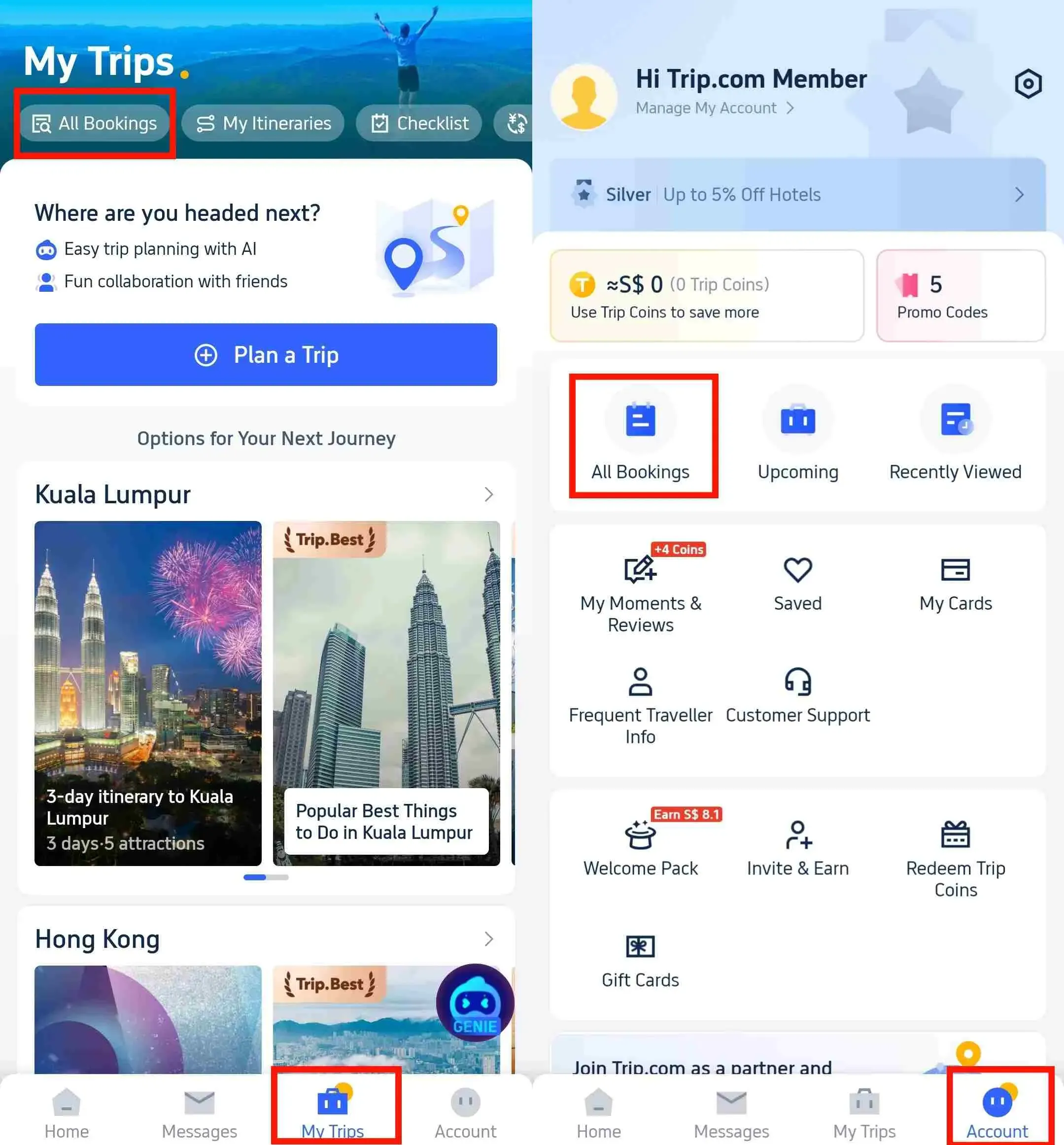
Step 1: Find your booking in My Trips
- Open the Trip.com app on your mobile device and log in to your account.
- Simply tap 'My Trips' at the bottom of the Trip.com app to view the details of your bookings.
- All your bookings are clearly displayed by date and time on the My Trips page.
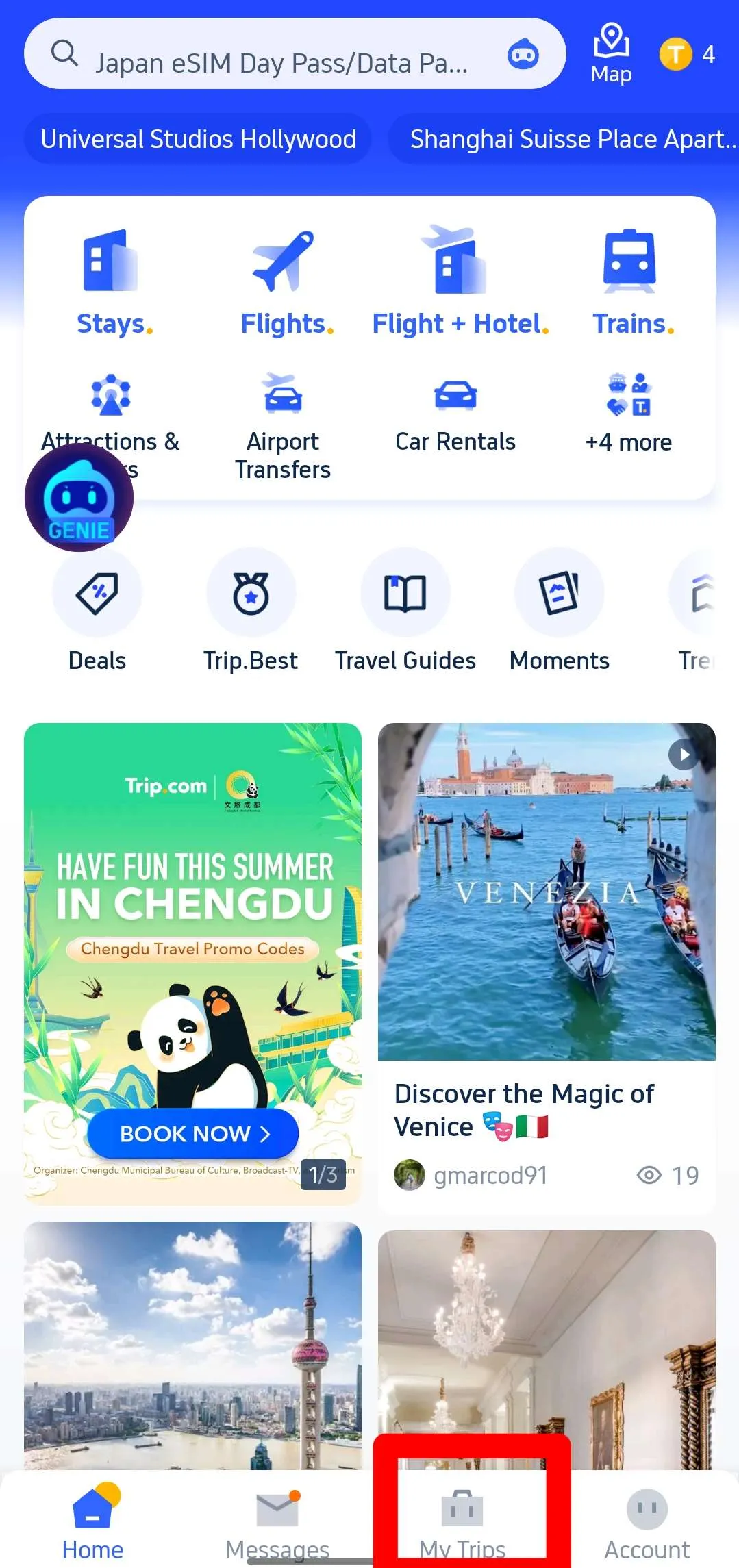
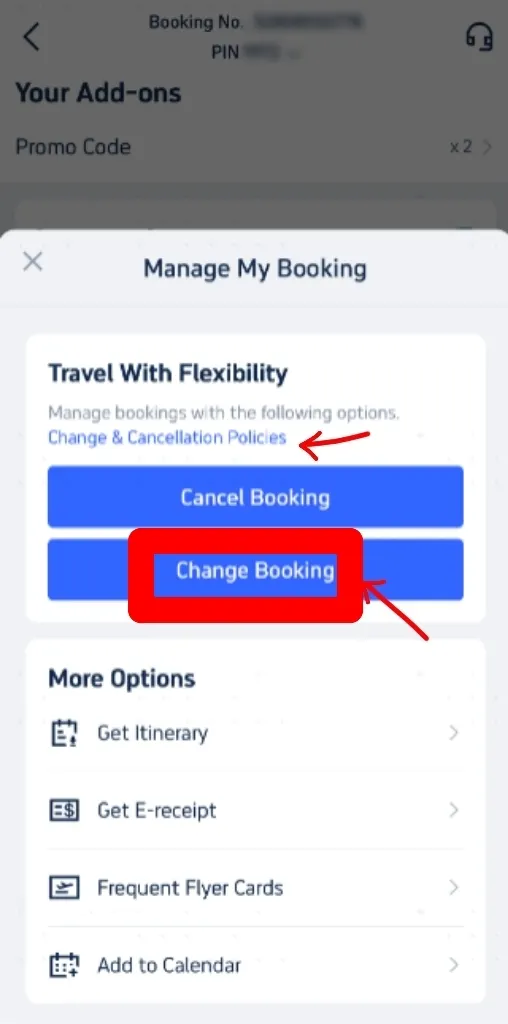
Step 2: Go to Manage My Booking and Change Booking
- Choose the ticket you'd like to change from your booking history. Head over to the reservation page for your booking and click "Manage My Booking".
- You can find Trip.com's ticket change fees and cancellation rules by clicking on 'Cancellation & Change Policies'.
- On the 'Manage My Booking' screen, select 'Change Booking' to head over to the change request page. You'll be able to review these policies once more while you're there.
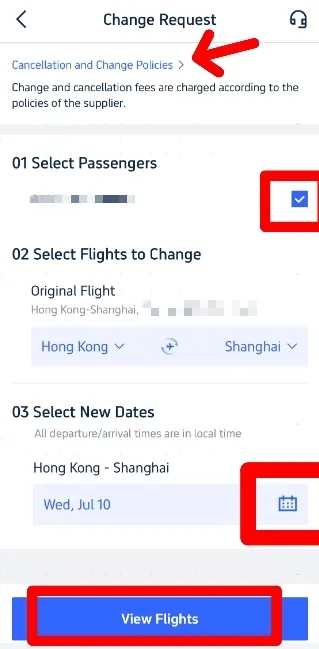
Step 3: Enter your details on the 'Change Request' page
- On the 'Change Request' page, select the passengers who need to change their flight.
- Confirm it’s the original flight you want to change and select your new travel dates by clicking the calendar button.
- Once you've entered all the information, click on 'View flights'.
Step 4: Select New Flights
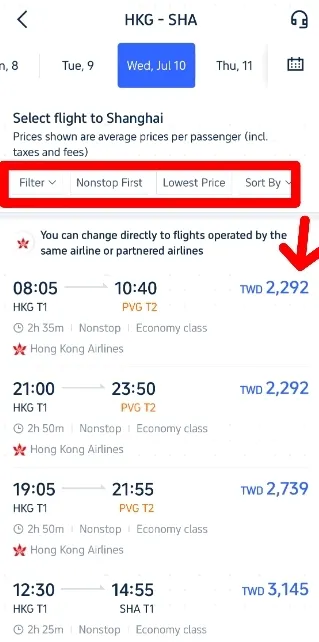
On the next page, browse the available flights and pick the one that suits you best.
Use filters like ‘Non-stop’ or ‘Lowest Price’ to find your perfect flight. Just make sure the new flight is operated by the same airline or one of its partners.
Tap the flight you'd like to change, then select Economy or Business Class and choose the option that suits you best.
Step 5: Confirm your booking
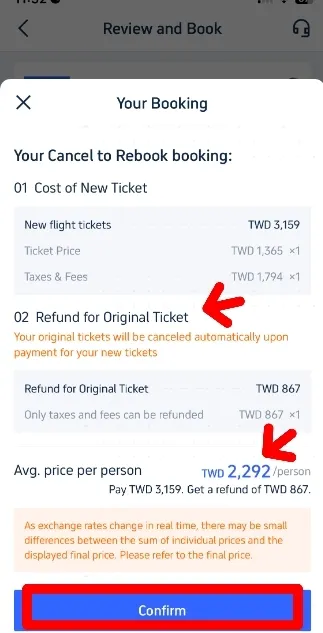
- Once you've selected your flight, head over to the 'My Bookings' page to confirm your new booking details.
- Check the refund for your original ticket against the cost of the new ticket. The final price will be calculated accordingly. 👇👇
- If you're happy with the new flight cost, simply 'Confirm' your selection and proceed to payment. Once payment is complete, you’ll receive confirmation of your updated booking. Do make sure to double-check that all the details are correct!
- Once confirmed, you'll receive a new booking confirmation email and a refund confirmation email. The actual timing of the refund will depend on your bank or card issuer.
How to Change Your Hotel Booking on Trip.com
Step 1: Log in to your Trip.com account or app and head to “My Bookings” → select your hotel booking.
Step 2: Tap ‘Change’ to update your check-in/out dates, room type or guest details.
- To adjust your check-in or check-out dates, switch to a different room type, or edit guest information.
Step 3: Confirm your changes and pay any price difference.
- Review the updated reservation details carefully before finalising your request.
- If the new booking costs more, pay the additional amount to complete the amendment successfully.
Fees for Booking Changes

Airline Fees
Depending on the fare class and airline rules (this can range from S$50 to over S$200).
Hotel Fees
Free for flexible bookings; non-changeable for restricted rates.
Trip.com Service Fees
Sometimes applies, depending on the booking
How to Save on Change Fees

Book Flexible Options
Always opt for flexible flight tickets or hotel bookings if your plans aren't quite set in stone yet, as they allow for much easier changes without those hefty penalties.
Change Early
Try to make changes as soon as possible, as last-minute modifications often come with higher fees and limited availability.
Discover Promotions
Keep an eye out for Trip.com promotions, as they sometimes waive change fees or offer discounts that can help you save money.
Summary
Changing your Trip.com booking is possible, but rules vary depending on the airline, hotel or service provider.
Always make sure to check the fare conditions before you book, and use the Trip.com app to request any changes quickly. With a bit of planning, you can manage your trip smoothly and avoid any unnecessary costs.
FAQ – How to Change a Flight or Hotel Booking on Trip.com
-
Can I change passenger names on Trip.com?
-
Can I change my hotel check-in date on Trip.com?
-
How long does it take for changes to be confirmed?
-
Can I change a booking after check-in?
-
Do I need to pay extra when changing a booking?