Set Up a Price Alert to Book Cheaper Flights

By Trip.com
February 9, 2026
Ever wondered when the best time is to bag the cheapest flights? The truth is, finding affordable fares takes time and constant monitoring, as prices can fluctuate frequently. But if you're looking to save on your trip, Trip.com offers a really handy tool to make things simpler — the Trip.com Price Alert.
Thanks to this brilliant feature, you'll be instantly notified the moment those discounted flight tickets drop, meaning no more endless price-checking! So here's a quick guide on how to get the most out of Trip.com's Price Alerts. We'll walk you through what it is, how to get it set up, and even throw in a few extra insider tips to help you snag the most affordable flights possible from the UK!
How to Use Trip.com Price Alerts
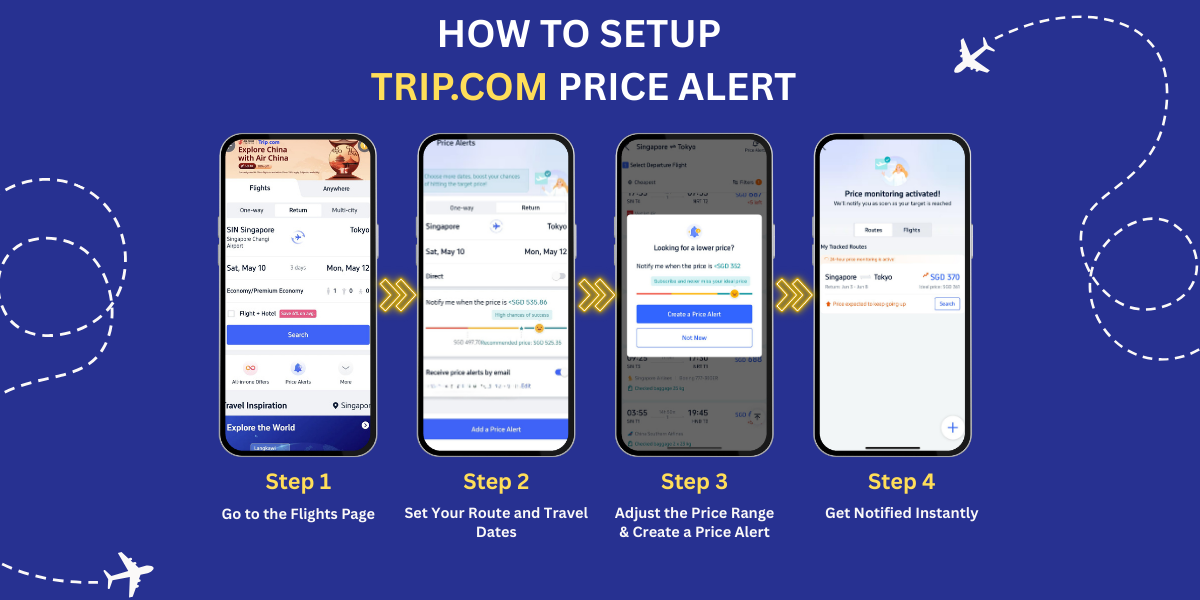
Trip.com Price Alert Step 1: Go to the Flights Page
Start by opening the Trip.com website or mobile app. Head over to the 'Flights' page, and you'll spot a 'Price Alert' button at the bottom of the screen, just below the search bar. Simply click on it to get started!
Trip.com Price Alert Step 2: Set Your Route and Travel Dates
Once you click the Price Alert button, you’ll be directed to the settings page. Here, enter your departure city, destination, travel dates, and any other relevant flight details.
Trip.com Price Alert Step 3: Adjust the Price Range
Use the price slider to set your budget for the trip. Trip.com will also show you the success rate of getting tickets within that price range:
- Red: Low success rate
- Yellow: Medium success rate
- Green: High success rate
Trip.com Price Alert Step 4: Get Notified Instantly
Choose to receive price alerts via email or push notifications on the Trip.com app. This way, you won't need to keep a constant eye on flight prices yourself. Trip.com will let you know as soon as prices drop.
Top Tip: Getting a notification doesn’t mean the fare will stay the same — so check the ticket right away and book as soon as you're ready to lock in the deal.
How to Find Cheap Flights with Trip.com Price Alerts

Source: iStock
Step 1: Book at the Right Time
Timing is crucial to securing the best airfare deals! For international flights from the UK, the most affordable rates are typically available around three months in advance. You’re also more likely to find great deals early in the morning, particularly on Tuesdays just after midnight. If you're booking last-minute for a same-day flight, try checking around midnight or in the early hours — airlines often release discounted fares at unconventional times!
Step 2: Avoid Peak Travel Periods
Flight prices often rise during UK school holidays, major festive periods (such as Christmas and Easter), and on weekends. To maximise savings, consider planning your travel for off-peak times like the shoulder seasons (autumn and spring), when airlines frequently run seasonal promotions and offer lower fares.
Step 3: Track Prices with Trip.com Price Alerts
Use the Trip.com Price Alert tool to track fare changes for your selected route and travel dates. Simply set your budget, and you’ll be notified when the price drops to your desired range — no need to check constantly!
Step 4: Subscribe to Trip.com’s Special Offers
On the Price Alert page, don’t forget to subscribe to Trip.com’s latest deal notifications. You’ll receive timely updates on the best discounts and offers, ensuring you never miss out on a great deal again.
Trip.com Price Alerts: Key Takeaways
Finally, always remember that flight prices can change at any moment due to demand, promotions, and seat availability. But with the help of Trip.com Price Alerts, along with a few smart booking strategies, you can easily grab great flight deals. Don’t wait — turn on Trip.com Price Alerts now in the Trip.com app and start saving on your next trip!