How to Use the Trip.com App in ChatGPT for Travel Planning

By Trip.com
August 4, 2026

If you've ever made travel plans, you are familiar with the process. You begin with twenty open tabs in your computer, alternating between calendars, airline websites, and flight search engines. After adjusting your dates by one day and waiting for the page to reload, you discover that the cost has increased. It takes a lot of time and frequently feels more like a chore than the beginning of a holiday.
A faster way to plan travel with Trip.com in ChatGPT
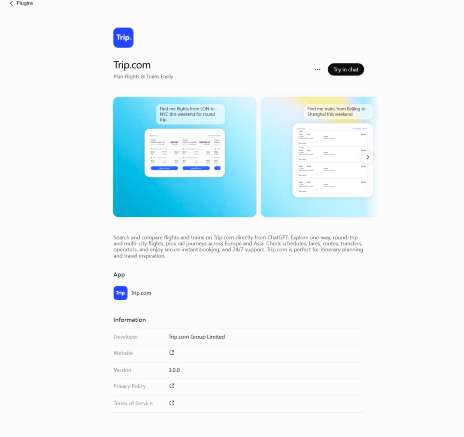
The Trip.com app in ChatGPT helps travellers search and compare transport options directly through conversation. Instead of filling out traditional search forms, you can simply describe your travel plans in natural language and explore flight and train options based on your needs.
Whether you are planning an international trip, looking for a convenient flight route, or checking train journeys across Europe and Asia, the Trip.com app makes travel planning faster and easier within ChatGPT.

What is the Trip.com app in ChatGPT?
A specialised travel tool integrated right into the ChatGPT interface is the Trip.com app. Consider it a dialogue link between your travel-related ideas and Trip.com's extensive travel database. You can use simple English to describe your trip instead of navigating through dropdown menus and filters.
At the moment, flight search is the main emphasis of the Trip.com app on ChatGPT. You can ask ChatGPT to locate choices for you, whether you're looking for a short domestic stop or a lengthy foreign trip. This represents a substantial change from the conventional method of searching on the internet.
It is important to remember that Trip.com is one of the world's leading travel service providers, and this integration brings their reliable flight data into the AI space. You get the benefit of real-time search results combined with the flexibility of a chatbot. You don’t need to know the exact airport code or the perfect flight number; you just need to know where you want to go and when.
Can I use the Trip.com app in ChatGPT now?
Yes, many users can access the Trip.com app today, but there are a few things to keep in mind. First, you will need to be logged into your ChatGPT account. Because ChatGPT offers different plans and features depending on your region and subscription level, the way you access the app might vary.
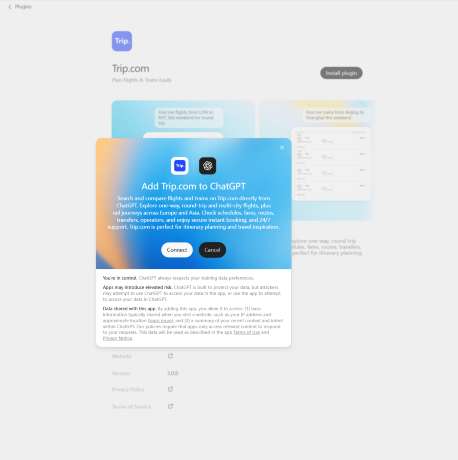
In some cases, you may need to "connect" or "enable" the Trip.com app from the ChatGPT store or your settings before you can start searching. If you are using ChatGPT at work, your workspace administrator might need to allow access to third-party apps first.
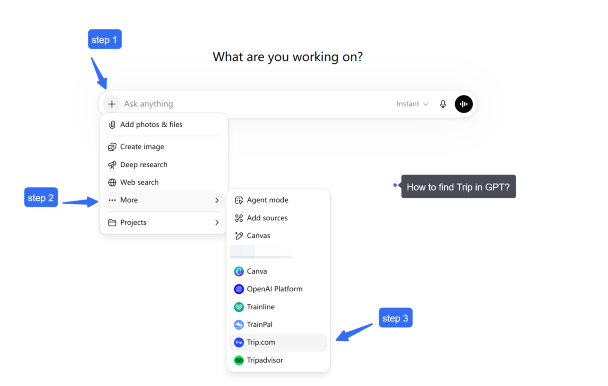
If you do not see Trip.com in your ChatGPT apps list, availability may depend on your region, account type, or workspace settings. It is a good idea to check the "Explore GPTs" or "Apps" section of your ChatGPT sidebar to see if it is available for you. Because AI tools are updated frequently, the entry point might look slightly different for everyone, so stay flexible as you explore the interface.
What can you do with Trip.com in ChatGPT?
The Trip.com app in ChatGPT helps you search and compare flights and trains without leaving the conversation.
You can use it to:
Search flights
- Find one-way, return, or multi-city flights
- Compare departure times, durations, airlines, and fares
- Search flexible travel options when your dates are not fixed
- Explore different routes based on your destination and preferences
Search trains
- Find train routes and schedules across supported regions
- Compare departure and arrival times, travel duration, transfers, seat classes, and fares when available
- Plan rail journeys for high-speed, intercity, and cross-border routes
Plan your journey naturally
Instead of entering multiple filters, you can simply ask questions such as:
- “Find flights from London to Paris next weekend”
- “Show me trains from Paris to Amsterdam”
- “What is the best way to travel from Tokyo to Osaka?”
- “Help me plan a trip combining flights and trains”
Book cheap flights on trip.com
to Paris
to Edinburgh
to Dubai
to Rome
to Barcelona
See all flights


How to search for flights and trains with Trip.com in ChatGPT?
Searching for flights and trains with Trip.com in ChatGPT is simple. Just describe your travel needs in natural language, including your destination, travel dates, and preferences.
For example:
- “Find flights from London to Paris next week.”
- “Search trains from Paris to Amsterdam.”
- “Help me find the best way to travel from Tokyo to Osaka.”
Trip.com in ChatGPT will help you explore available flight and train options, including schedules, routes, duration, and fares when available.
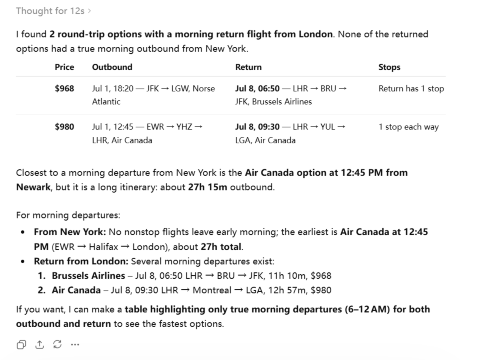
Let's try:
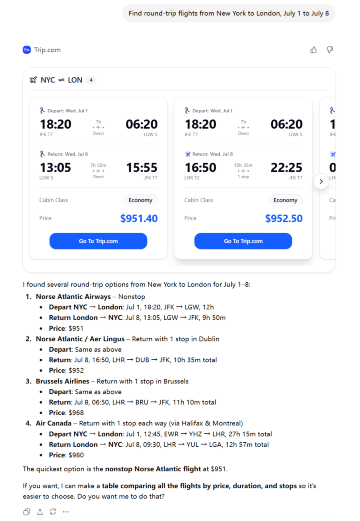
If you input "Show flights leaving in the morning," you will receive pre-screened information:
Best eSIM for International Travel
See all attractions
 374500 booked





What should I type to get better travel results?
To get more relevant results, include key details such as:
- Departure and destination cities
- Travel dates or flexible date preferences
- Flight or train preference
- Number of travellers
- Any specific requirements
Examples:
- “Find a direct flight from New York to London in August.”
- “Show me high-speed trains from Beijing to Shanghai.”
- “Find the cheapest way to travel from Paris to Rome.”
Travel goal | Better prompt example |
Find a basic round trip | “Find return flights from New York to London from July 1 to July 8.” |
Search by airport | “Find flights from JFK to London, preferably arriving at Heathrow.” |
Avoid long layovers | “Show flights with no long layovers or stops over 3 hours.” |
Find cheaper options | “Can you show cheaper dates or nearby airports like Newark?” |
Business travel | “Find flights from Singapore to Frankfurt for a business trip, leaving Monday morning, direct.” |
Remember, you can start broad. If you aren't sure which airport in London you want to use, just say "London." The AI will show you options, and then you can narrow it down once you see the prices and times.
When asking for information, the more detailed the description, the more accurate the result.
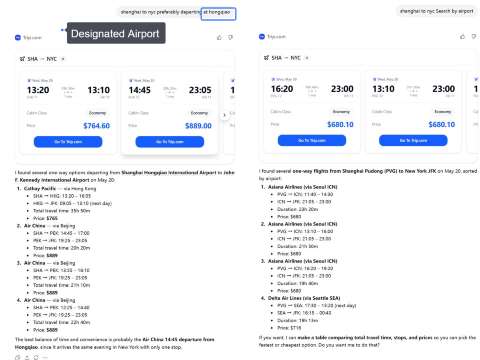
How to compare flight and train options in ChatGPT after the first search?
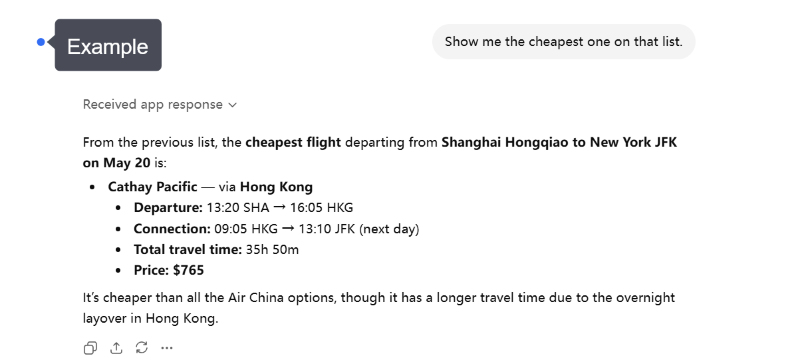
After your first search, you can continue the conversation with Trip.com in ChatGPT to refine and compare different travel options.
For flights, you can compare:
- Departure and arrival times
- Travel duration and stops
- Airlines and fares
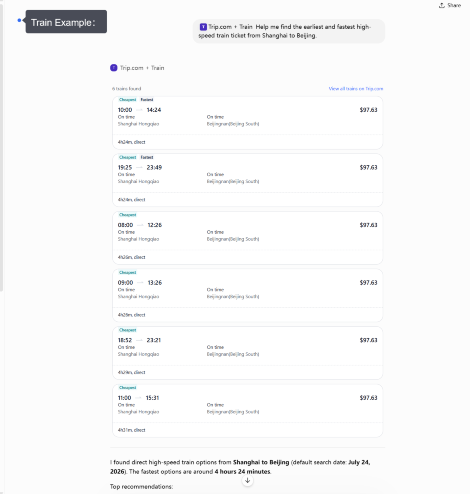
For trains, compare:
- Departure and arrival times
- Travel duration and transfers
- Train types, seat classes, and fares when available
Choose the option that best fits your schedule, budget, and travel preferences.
What to check before booking flights or trains?
Before moving forward with your booking, review the key details to make sure your choice matches your travel plans.
For flights, check:
- Travel dates and passenger information
- Airport locations and flight times
- Baggage rules and fare conditions
For trains, check:
- Departure and arrival stations
- Train schedule and journey duration
- Seat class and ticket conditions
- Final Price: Verify the total cost, including any taxes or fees, before you pay.
Always remember that the flight rules and cancellation policies are set by the airlines. Read the fine print on Trip.com before you hit the "buy" button.
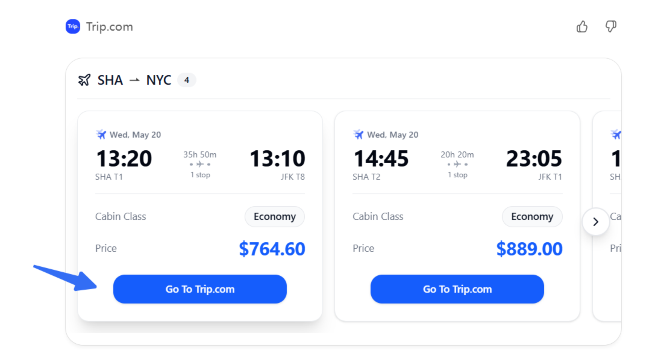
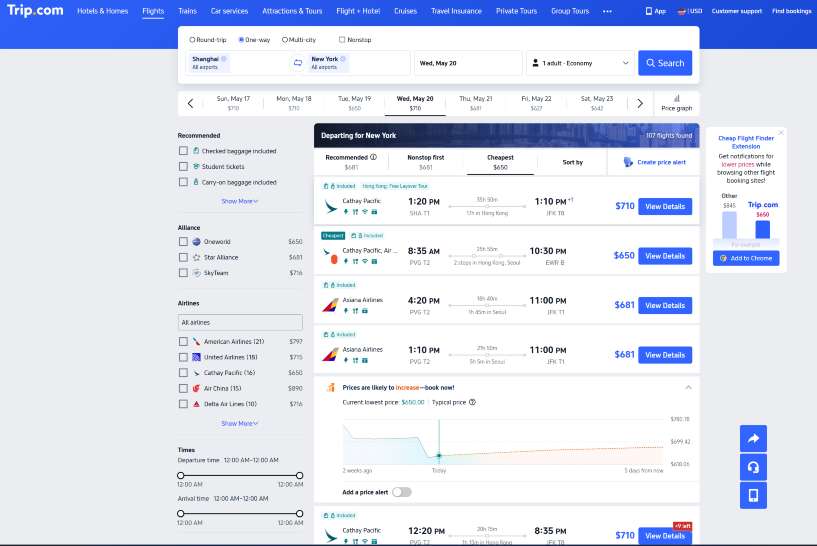
More travel possibilities with Trip.com in ChatGPT
Trip.com in ChatGPT continues to make travel planning easier by helping travellers explore transport options through natural conversations.
With flights and trains available, you can plan more complete journeys, compare different routes, and find options that match your travel needs.
Future improvements may bring more ways to discover and organise your trips with Trip.com in ChatGPT.
Future travel need | What users may want to do | Example future prompt |
Hotels | Compare locations, prices and amenities such as pet-friendly rooms or free Wi-Fi. | “Find hotels near Shinjuku for two adults with breakfast.” |
Car rentals | Search for SUVs, economy cars or luxury vehicles at specific pick-up locations. | “Find a rental car at LAX from Friday to Monday.” |
Attraction tickets | Book museum tickets, theme park passes or local tours. | “Find attraction tickets in Singapore for this weekend.” |
Airport transfers | Arrange transport from the airport to your hotel or other destinations. | “Find airport transfer options from Bangkok Airport to my hotel.” |
Travel packages | Create a complete trip package with flights, hotels and activities to save time and money. | “Help me plan a 5-day trip to Seoul with flights and a hotel.” |
By building a flight search foundation now, Trip.com is preparing for a future where travel planning is a single, continuous conversation.
Conclusion: Start with one simple travel request
Using the Trip.com app in ChatGPT takes the stress out of the initial travel search. Instead of staring at empty search boxes and complicated filters, you can just start talking about where you want to go. Whether you are looking for a quick getaway or a complex international journey, the AI can help you narrow down your flight options in seconds.
While the app is currently focused on flights, it is growing into a powerful travel assistant that will eventually handle hotels, cars, and more. Give it a try for your next trip—start with a simple request like "Find me a flight to Paris in June," and see how easy travel planning can be.
Best hotel deals and recommendations
Top hotels in popular cities
London
Paris
Amsterdam
Dubai
New York
Tokyo
See All Hotels

















































FAQ – Using the Trip.com app in ChatGPT
-
Is the Trip.com app in ChatGPT the same as the Trip.com mobile app?
-
Can I search for cheap flights with Trip.com in ChatGPT?
-
Can I book directly inside ChatGPT?
-
Can I change my flight search after seeing results?
-
Does Trip.com in ChatGPT show real-time flight prices?
-
What information should I include in my prompt?
-
What should I double-check before booking?
-
Can I search train tickets with the Trip.com app in ChatGPT?
-
Can I compare flights and trains for my trip?
Disclaimer: This article has been provided by an individual contributor or third party platform. If there is any discrepancy regarding the copyright, please contact us directly and we will delete the content immediately.