How to Change Hotel Booking Dates on Trip.com

By Trip.com
November 24, 2026

Changing your hotel check-in date on Trip.com can be useful when your travel plans change unexpectedly or you need to adjust your stay.
Whether you want to arrive earlier or extend your trip, you may be able to change your booking without making a new reservation.
However, whether you can change your check-in date depends on the hotel's availability, cancellation policy and booking conditions.
In this guide, we'll explain how to request a check-in date change on Trip.com, what to do if the option isn't available, and share useful tips to help you manage your hotel booking smoothly.
How to change your hotel booking dates on Trip.com?
You've booked the perfect room, but your travel plans have changed. No worries! You may be able to request a change to your booking dates directly in the app. If the request is approved, your original booking will be cancelled and a new booking will be created automatically. The hotel will need to reconfirm the change, usually within 24 hours. Here's a step-by-step guide on how to request a change to your booking dates on Trip.com:
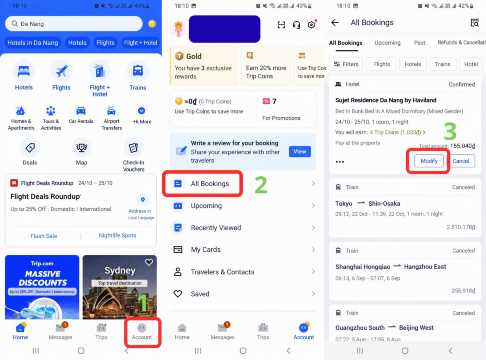
- Step 1 - Go to Account: Open the Trip.com app, log in to the account you used to make your booking, then tap Account in the bottom-right corner of the screen.
- Step 2 - Select All Bookings: On your account page, tap All Bookings to view your booked services.
- Step 3 - Find your hotel booking and tap Modify: On the All Bookings page, select the Hotel filter to find your booking more quickly. Check the hotel name, check-in date and check-out date, then tap Modify on the booking you want to change.
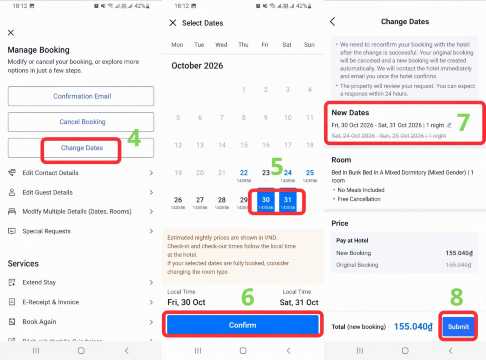
- Step 4 - Select Change Dates: In the Manage Booking window, tap Change Dates to open the calendar and choose your new stay dates.
- Step 5 - Select your new check-in and check-out dates: Tap the date you want to check in, then select your new check-out date.
- Step 6 - Tap Confirm: To request a change to your booking dates, tap Confirm to proceed to the adjustment details screen.
- Step 7 - Check your new dates and room rate: On the Adjust Dates page, review the New Dates section, room details, cancellation policy and the updated booking price. If you want to choose different dates, tap the pencil icon next to the new dates.
- Step 8 - Submit your date change request: Once you've checked that all the information is correct, tap Submit in the bottom-right corner. Then check the app and your email for confirmation of your request.
🏷️ Save more on your next trip with the latest Trip.com promo codes.
Book affordable hotels on Trip.com
London
Paris
Amsterdam
Dubai
New York
Tokyo
See All Hotels
 NO.1

















































Is there a fee for changing hotel booking dates on Trip.com?
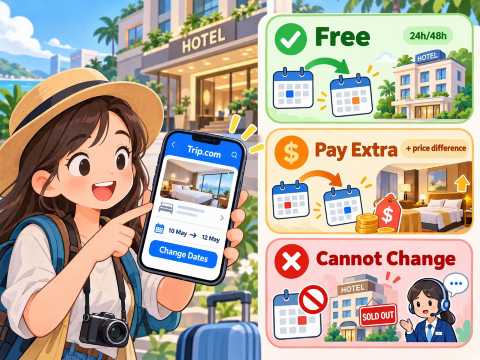
Depending on the hotel's policy, the room type you've booked and availability for your new dates, you may encounter one of the following three scenarios:
- Case 1 - Free date change: The hotel allows free changes and you make the change within the 24 or 48-hour window. If the room rate for your new dates has not increased, you will not need to pay any additional fees.
- Case 2 - Date change allowed but requires additional payment: You may need to pay a date change fee according to the hotel's policy, the difference in room rate, or both. For example, your new dates may fall during a public holiday when prices are higher, or your original room type may no longer be available and you agree to switch to a more expensive room type. So, even if the date change itself is free, you may still need to pay the difference in room rate.
- Case 3 - Date change not allowed: If the hotel's policy does not allow date changes, or the hotel is fully booked for your new dates, you will not be able to change your check-in date. In this case, contact Trip.com's customer support team to check what options may be available before booking another room.
What if you cannot change your hotel booking dates on Trip.com?

If you don't see the change date option or can't complete your request, check these four scenarios to see what you can do:
- The hotel does not allow date changes: For non-refundable bookings with terms that do not allow changes, you cannot change the date yourself on Trip.com. If something unexpected comes up, you can contact Customer Service and ask them to contact the hotel to see if they can offer any special assistance. The outcome will depend on the individual booking.
- The date change deadline has passed: Hotels may only allow date changes up to a certain time. If you have missed the deadline, contact us to check whether any other options are available and whether additional fees may apply.
- Contact the hotel directly: Some hotels may be flexible and allow date changes even if this is not stated in their booking policy. You can try contacting the hotel directly to ask whether they can change your dates. If the hotel agrees, let Trip.com Customer Service know so they can update the new dates on the app for you.
- The policy allows changes but the system shows an error: If the hotel allows date changes but you cannot select a new date or submit the request yourself, go to the Trip.com Customer Service page and select Chat or Call Us.
Book cheap flights on trip.com
to Paris
to Edinburgh
to Dubai
to Rome
to Barcelona
See all flights


What information do you need to change your hotel booking?

If you're unsure how to change your booking dates or can't do it yourself on Trip.com, you can contact Customer Service for help.
Before getting in touch, it's a good idea to have the following information ready. This will help our team find your booking quickly and check the new dates you'd like to change to:
- Trip.com booking number: You can find this in your confirmation email or under your booking details in the app. Trip.com recommends having this ready before calling or messaging Customer Service.
- Hotel name and guest name: Provide the exact details used when making the booking. Keep your confirmation email or contact phone number handy in case further verification is needed.
- Original and new stay dates: Provide the full day, month and year for both your original and requested check-in and check-out dates. If you want to extend or shorten your stay, make this clear so all the necessary changes can be handled together.
- Room type, number of rooms and number of guests: Let us know which details you want to keep and which you'd like to change. If you've booked multiple rooms but only need to amend some of them, specify exactly which rooms need updating.
- Reason for the change and any issues encountered: Explain why you need to change your dates, such as booking the wrong dates, changes to your travel plans, being unable to find the date-change option or receiving an error message in the app.
- Screenshots of error messages or hotel confirmation (if applicable): If you've contacted the hotel separately and it has agreed to change your dates, provide the confirmation message or email so Trip.com can verify the arrangement and help update your booking.
- Supporting documents (if requested): If you're requesting a change due to flight schedule changes or health issues, have relevant documents ready, such as an airline notification or medical documents, and submit them as instructed by Customer Service.
Best eSIM for International Travel
See all attractions






FAQ – Changing Hotel Booking Dates on Trip.com
-
Can I change my hotel booking dates on Trip.com?
-
How do I change my hotel booking dates on Trip.com?
-
Can I change my hotel booking dates for free?
-
What happens if the hotel doesn't allow date changes?
-
Will I need to pay extra when changing my hotel booking dates?
Disclaimer: This article has been provided by an individual contributor or third party platform. If there is any discrepancy regarding the copyright, please contact us directly and we will delete the content immediately.