How to Use the Trip.com Plugin in ChatGPT for Travel Planning

By Trip.com
September 23, 2026

Planning a trip often means switching between flight sites, hotel pages, train timetables, maps and things to do. Even a simple holiday can leave you with dozens of tabs open as you compare prices, locations, schedules and reviews. The Trip.com plugin in ChatGPT brings these tasks into one conversation, so you can search and compare flights, hotels, trains, attractions and tours using natural language.
A faster way to plan travel with Trip.com in ChatGPT
The Trip.com plugin helps travellers plan the key parts of a trip without filling in separate search forms again and again. Tell ChatGPT where you want to go, when you are travelling, how many people are going, and what matters most to you. The plugin can then search relevant Trip.com options and show them directly in the conversation.
You can start by comparing flights, then find a hotel close to the places you want to visit, check if taking a train would be more convenient for part of your journey, and finally look for attraction tickets or local tours. As your plans change, you can easily adjust your dates, budget or preferences without starting your search again.

What is the Trip.com plugin in ChatGPT?
The Trip.com plugin is a travel search tool that connects ChatGPT with Trip.com’s travel services. Instead of going through multiple menus and filters, you can simply describe your travel plans in everyday language. The plugin turns your request into a search for relevant flights, hotels, trains, attractions and tours.
For example, you can ask for a morning flight from Singapore to Tokyo, a hotel near Shinjuku Station, a high-speed train from Tokyo to Osaka, or family-friendly activities in Osaka. ChatGPT can help organise and compare the results, while Trip.com provides the available travel options and product details.
The plugin is especially useful when researching and comparing travel options. Once you choose an option, you will normally continue to Trip.com to check the latest details and complete your booking securely.
Can you use the Trip.com plugin in ChatGPT?
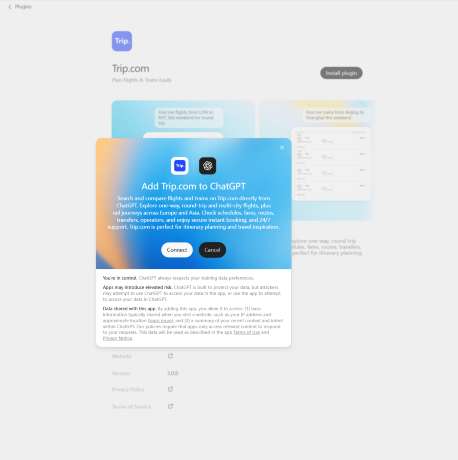
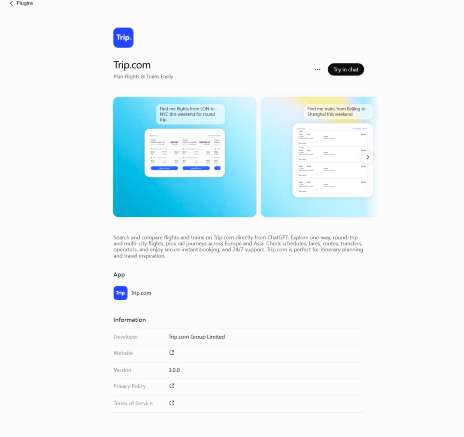
Yes, many users can access the Trip.com app today, but there are a few things to keep in mind. First, you will need to be logged into your ChatGPT account. Because ChatGPT offers different plans and features depending on your region and subscription level, the way you access the app might vary.
In some cases, you may need to "connect" or "enable" the Trip.com app from the ChatGPT store or your settings before you can start searching. If you are using ChatGPT at work, your workspace administrator might need to allow access to third-party apps first.
If you do not see Trip.com in your ChatGPT apps list, availability may depend on your region, account type, or workspace settings. It is a good idea to check the "Explore GPTs" or "Apps" section of your ChatGPT sidebar to see if it is available for you. Because AI tools are updated frequently, the entry point might look slightly different for everyone, so stay flexible as you explore the interface.
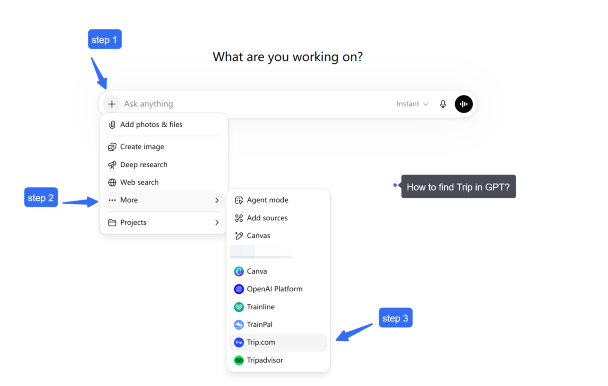
What can you do with the Trip.com plugin in ChatGPT?
The Trip.com plugin helps you search and compare key travel products without leaving the same ChatGPT conversation.
Search flights
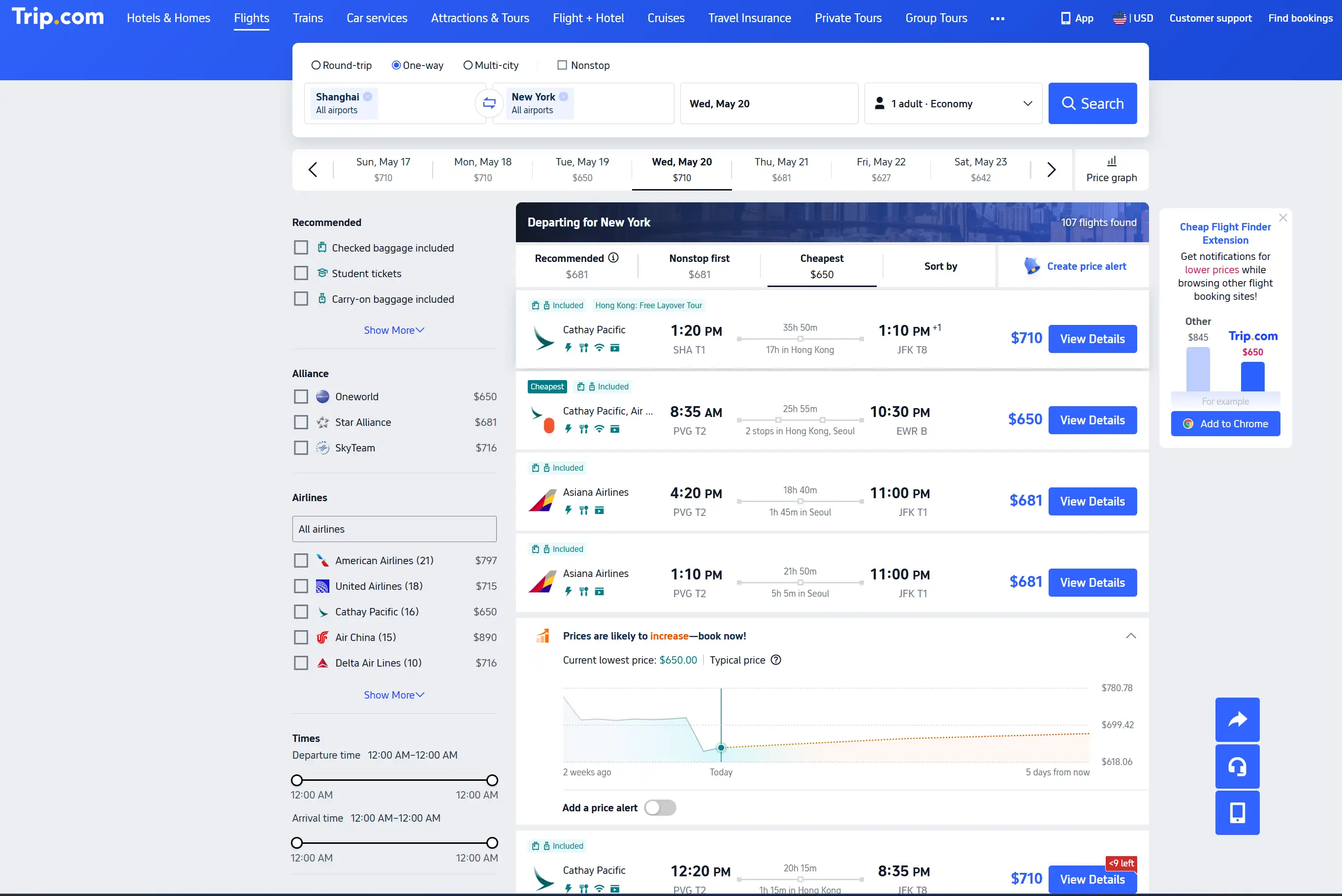
Search for one-way, return, or multi-city flights in one place. Results may show:
- Airlines
- Departure and arrival airports
- Flight times
- Total journey duration
- Stopovers
- Available fares
You can also refine your search by asking for non-stop flights, preferred departure times, shorter layovers, nearby airports, or cheaper travel dates.
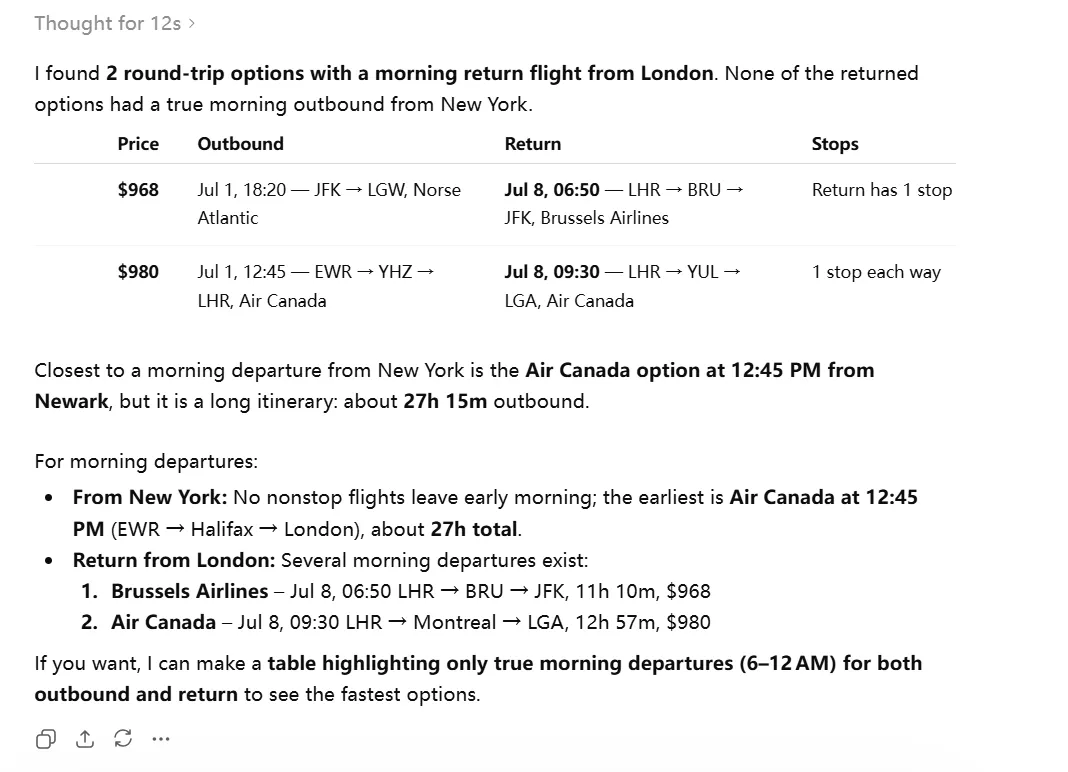
Let's try:
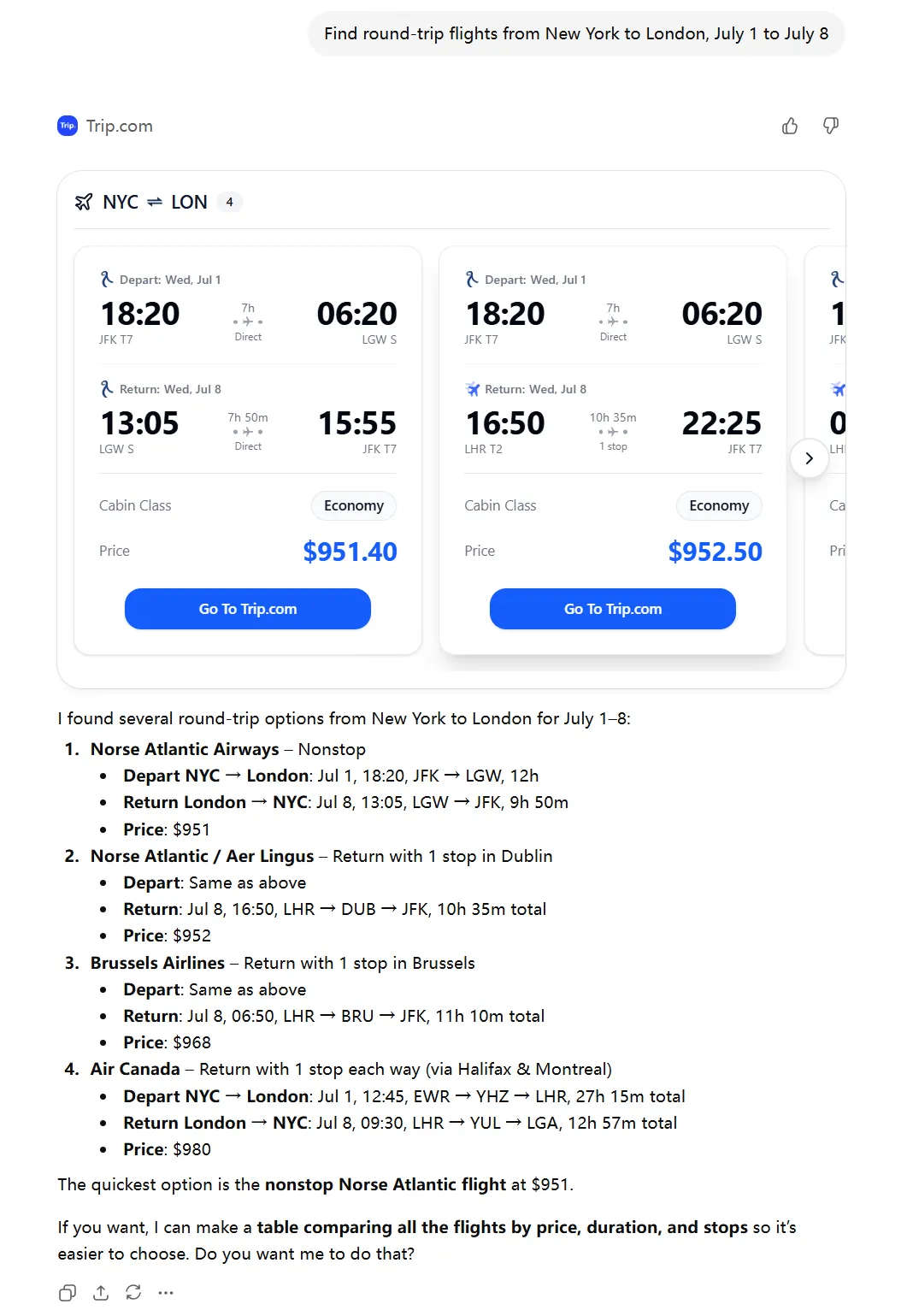
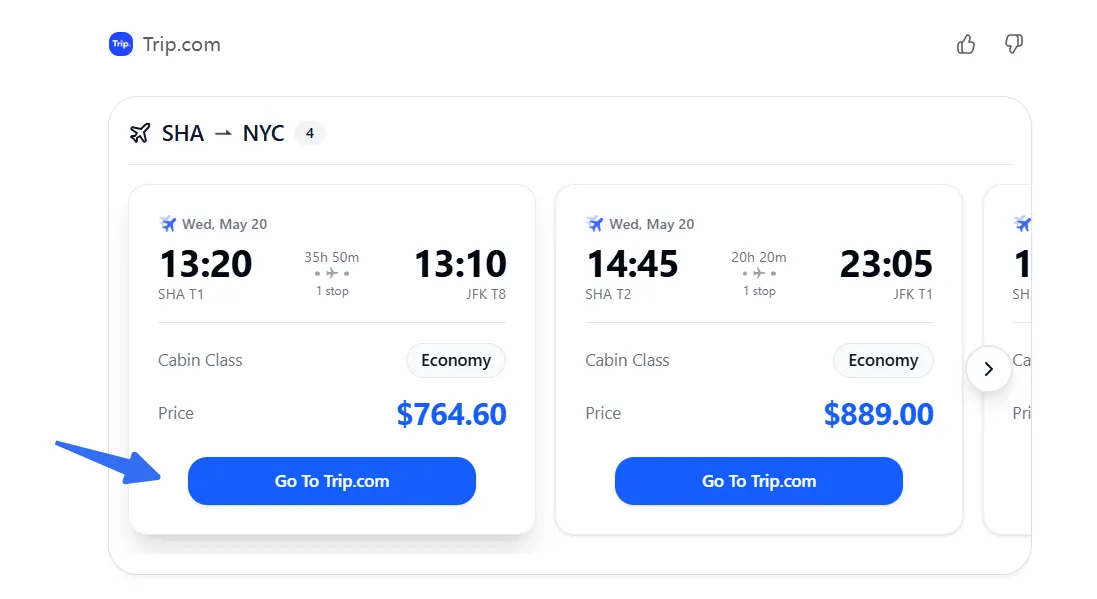
If you input "Show flights leaving in the morning", you will receive pre-screened information:
Find hotels
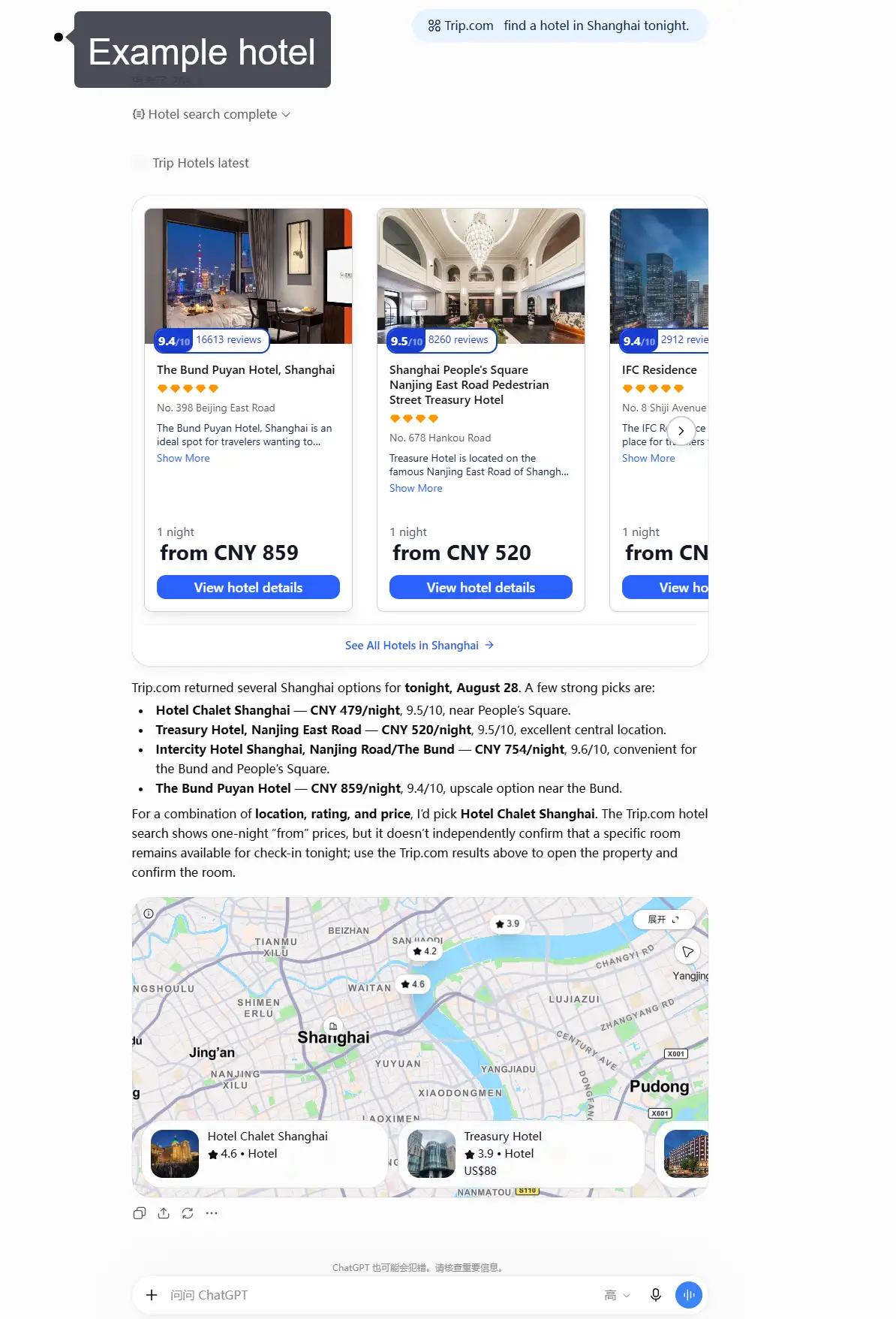
Search for hotels by destination, dates, number of guests, location, budget, star rating, or facilities. You can ask for a hotel near a train station, business district, beach, or attraction, then compare options by price, guest rating, room type, breakfast, and amenities.
For example, you can ask the Trip.com plugin to find a well-rated hotel in a specific area, then compare available rooms, prices, guest ratings, and facilities.
Search trains
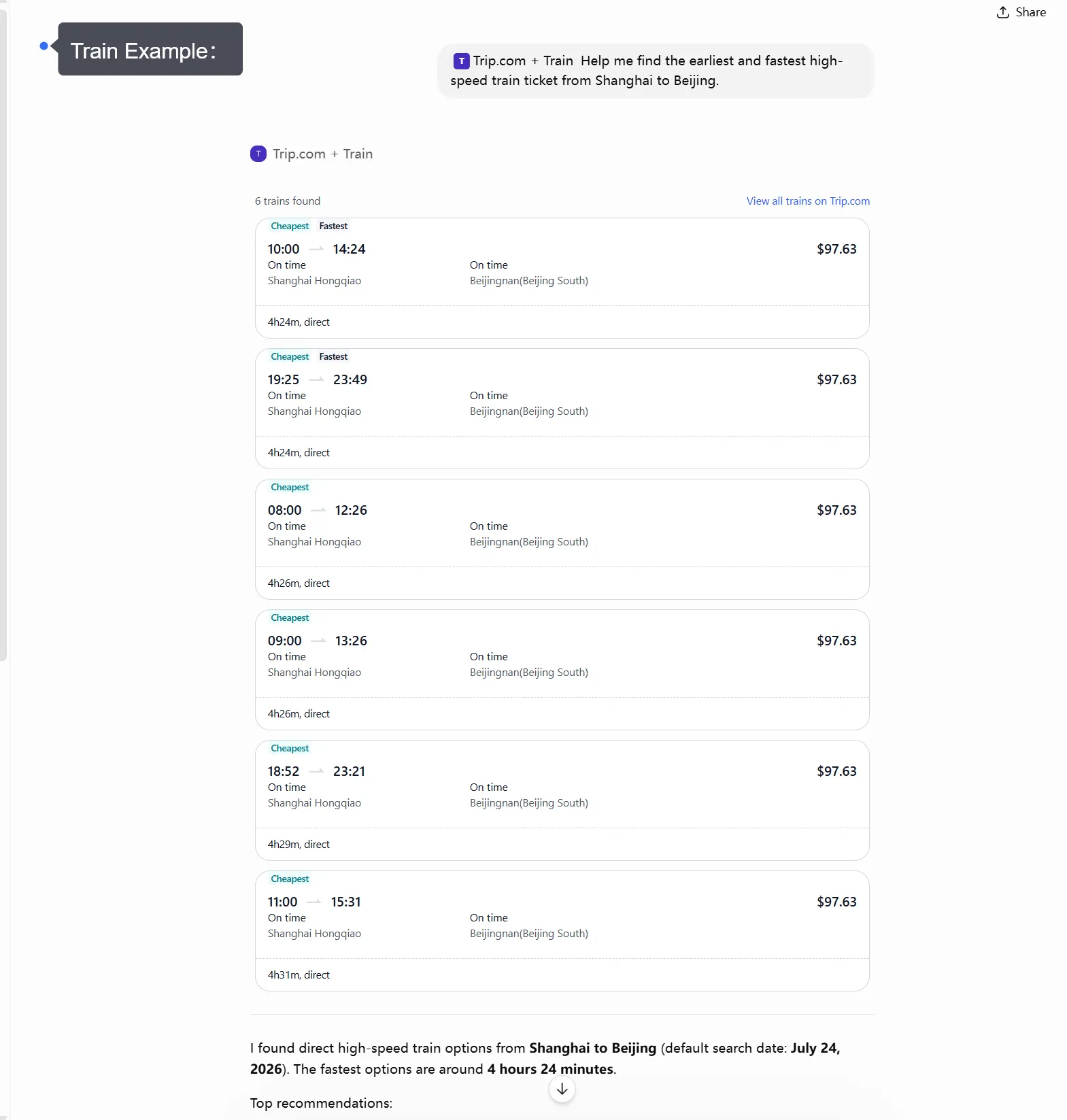
The plugin helps you find train routes and timetables in supported destinations. Depending on the route, results may include departure and arrival stations, journey times, transfers, train types, seat classes and fares.
It is useful for high-speed, intercity and cross-border journeys, as well as comparing train travel with flying.
Discover attractions and tours
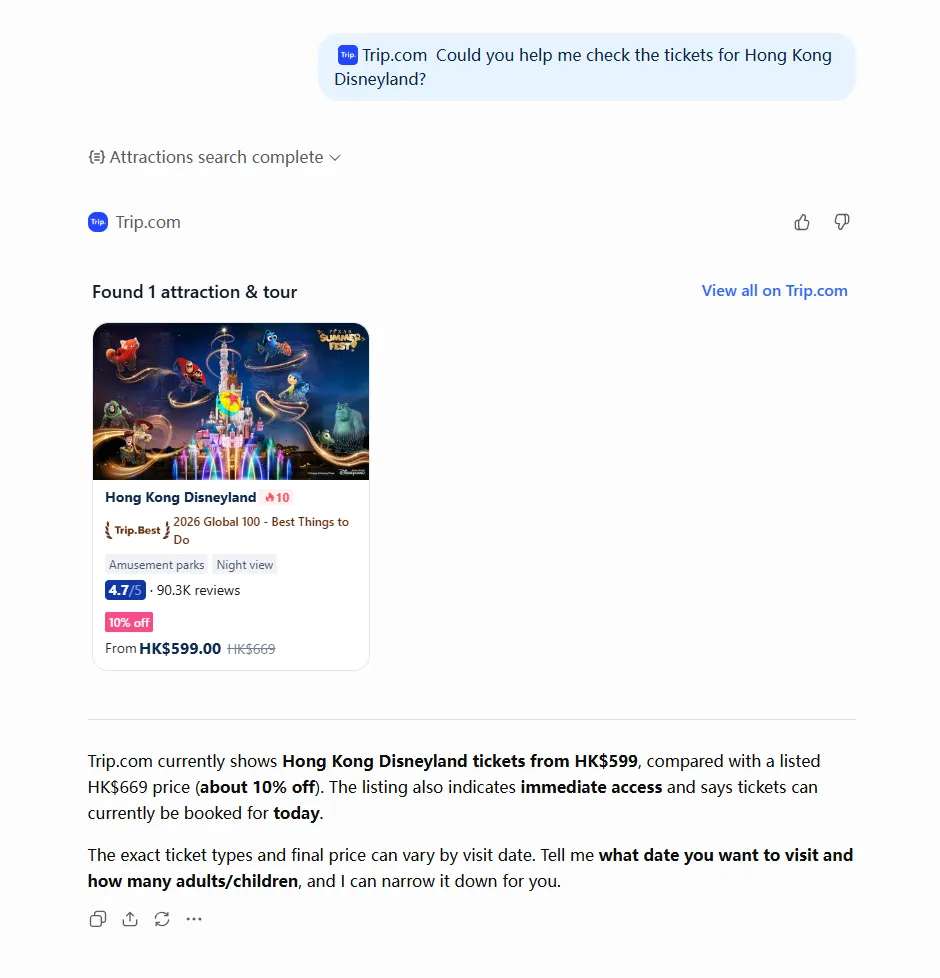
You can also use the plugin to find things to do at your destination. Ask about popular attractions, theme parks, museums, observation decks, cultural experiences, day tours, or family-friendly activities.
Depending on the attraction or tour, you may also find useful details such as opening times, ticket options, visitor ratings, tour duration, available languages, cancellation policies, and transport or hotel pick-up options.
Build a connected travel plan
You do not need to search for each service separately. Ask ChatGPT to put them together into a practical trip, such as a flight to Paris, a centrally located hotel, a train to Amsterdam, and attraction tickets in both cities. You can then adjust each part of your trip without starting the search again.
Book cheap flights on trip.com
to Paris
to Edinburgh
to Dubai
to Rome
to Barcelona
See all flights


How to use the Trip.com plugin to search for travel
Simply describe what you need in your own words and include any details you already know. There is no need to enter airport or station codes, or use exact product names.
For example:
- “Find return flights from London to Tokyo from 5 to 14 October.”
- “Show me hotels in Tokyo near a tube station for two adults.”
- “Find high-speed trains from Tokyo to Osaka on 9 October.”
- “What attractions should I book in Osaka for a family with two children?”
- “Help me plan a seven-day trip to Japan, including flights, hotels, trains and activities.”
Once you see the first results, keep chatting to refine your search. You can ask for a lower price, a better location, fewer changes, different dates, or activities that suit your travel needs.
Best eSIM for International Travel
See all attractions
 491078 booked





What should you include for better travel results?
The more details you provide, the better the plugin can tailor its results. Include your destination, travel dates, number of travellers, budget and any preferences that may affect your choice.
For flights, say if you need a one-way or return flight, your preferred departure time, cabin class and if you want to avoid stopovers. For hotels, include the area or nearby landmark, number of rooms, preferred star rating and facilities such as breakfast, parking, a swimming pool or free Wi-Fi.
For trains, give the departure and arrival cities, travel date, preferred time and seat class if relevant. For attractions and tours, mention the destination, date, group type, interests and any accessibility or language requirements.
Useful prompts include:
- “Find the cheapest direct flight from London to New York in September.”
- “Show four-star hotels near Shinjuku Station with breakfast included.”
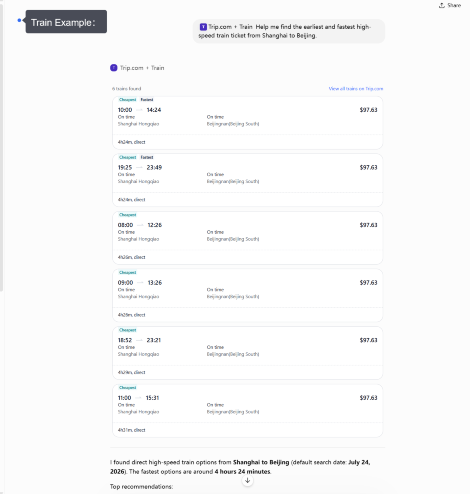
- “Find the earliest high-speed train from Shanghai to Beijing tomorrow.”
- “Show family-friendly attractions in Singapore that take less than half a day.”
- “Find an English-speaking day tour from Bangkok with hotel pick-up.”
You can also start with a broad request. ChatGPT can help you fill in the missing details before using the plugin for a more focused search.
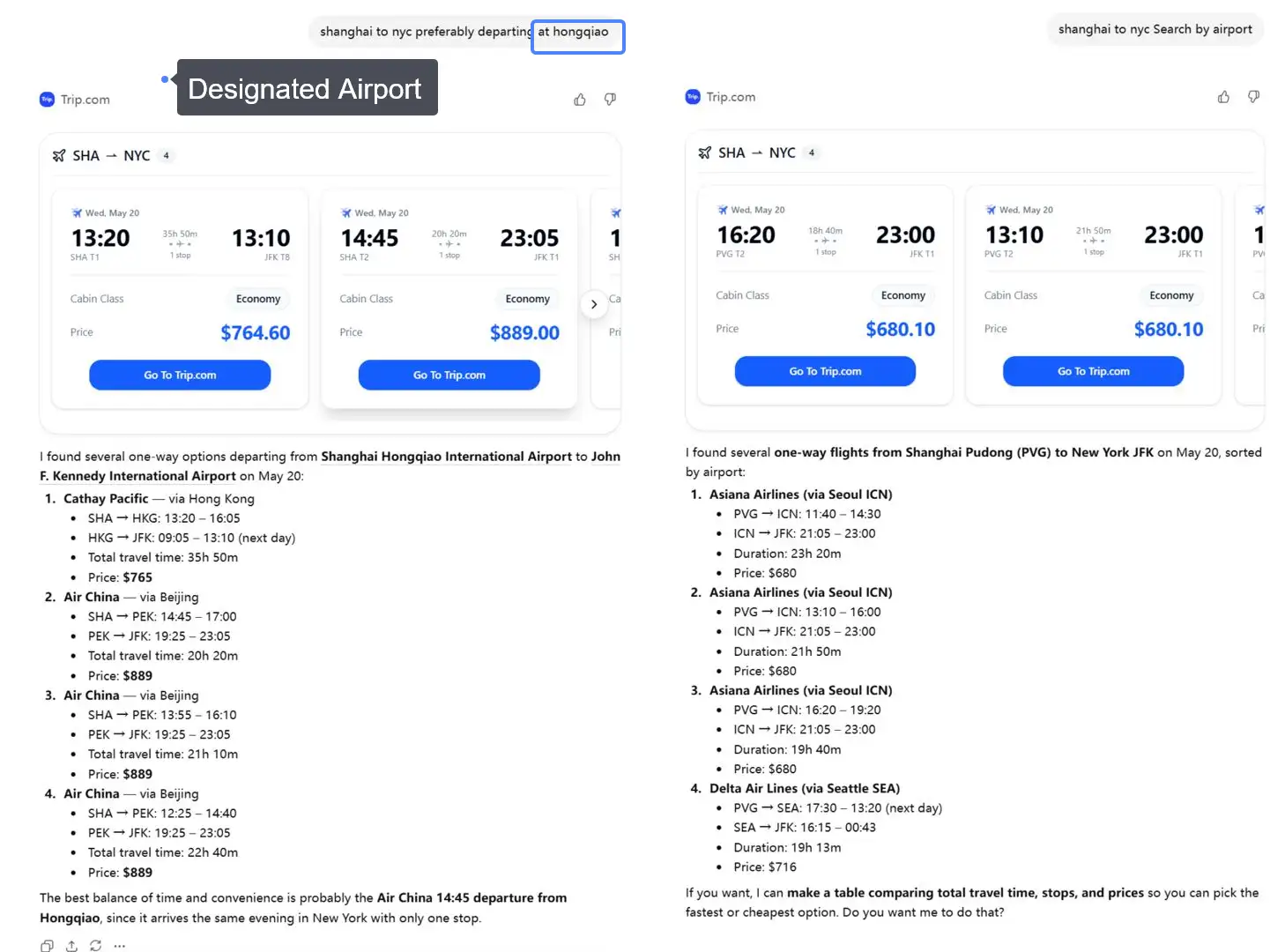
How to compare Trip.com options in ChatGPT
Continue the same conversation and tell ChatGPT what matters most to you.
For flights, compare the total price, airports, departure times, journey time, baggage allowance, and the number and length of stopovers. For hotels, check the location, nightly price, guest ratings, room details, breakfast, facilities, and cancellation policy.
For trains, compare the departure and arrival stations, journey time, transfers, train type, seat class, and ticket conditions. For attractions and tours, check the duration, start time, meeting point, what's included, available languages, age requirements, and cancellation policy.
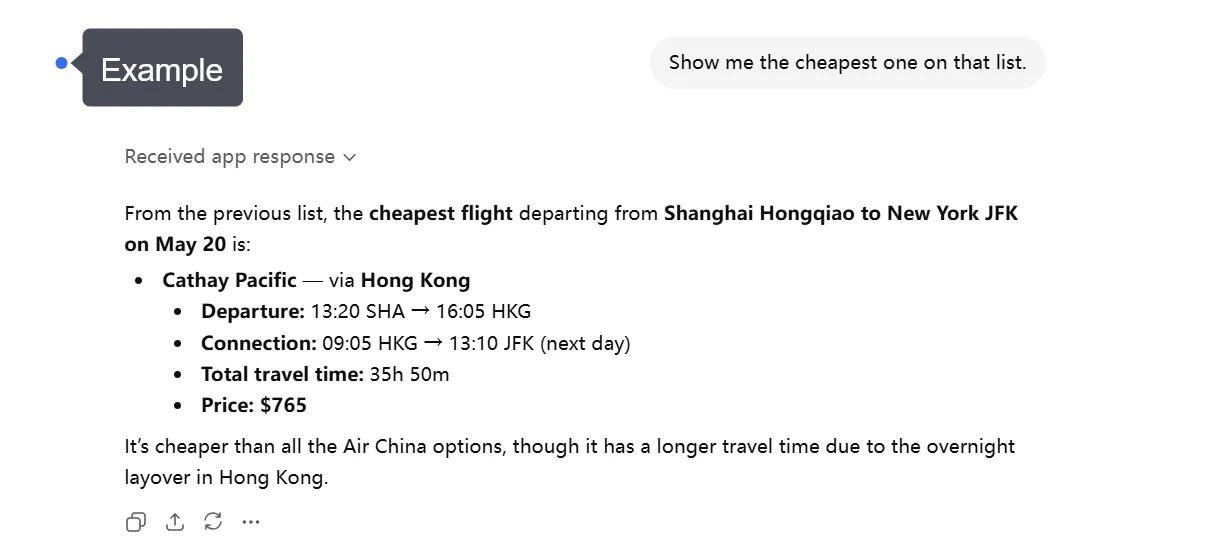
You can also compare options across different categories. For example, ask whether a train or flight is more convenient between two cities, or if paying more for a hotel could save time on daily transport. The cheapest option is not always the most suitable, so consider your schedule and overall travel plans too.
For trains, compare:
- Departure and arrival times
- Travel duration and transfers
- Train types, seat classes, and fares when available
Choose the option that best fits your schedule, budget, and travel preferences.
What should you check before booking?
Always check the final product page on Trip.com before confirming your booking, as prices and availability can change.
For flights, check:
- Passenger names
- Travel dates and airports
- Local departure and arrival times
- Baggage allowance
- Fare rules
- Cancellation and change conditions
For hotels, check:
- Hotel address
- Room type and guest capacity
- Taxes and fees
- Breakfast details
- Check-in requirements
- Cancellation deadline
For trains, check:
- Departure and arrival stations
- Train number and travel date
- Departure time
- Seat class
- Passenger requirements
- Ticket collection or boarding instructions
For attractions and tours, check:
- Date and time slot
- Meeting point
- What's included
- Age or height restrictions
- Language options
- Pickup arrangements
- Cancellation policy
The plugin can help you find and compare options, but always use the secure Trip.com booking page to confirm the final price, availability and booking conditions before you pay.
Plan more of your trip in one conversation
With flights, hotels, trains, attractions and tours available through the Trip.com plugin, ChatGPT can help you plan different parts of your journey together.
For example, after choosing a flight, ask ChatGPT to find a hotel near your arrival airport that fits your itinerary. You can then search for a train to your next destination and find attractions near your hotel. If your plans change, such as your flight date, you can ask ChatGPT to update the related hotel, train and activity searches.
This is particularly useful for multi-city trips. Instead of planning each booking separately, you can see how different choices fit together and adjust your plans as you go.
Conclusion: Start with one travel request
The Trip.com plugin makes it easier to turn a travel idea into a practical plan. You can search for flights, find hotels, compare train journeys and look for attractions or tours within the same ChatGPT conversation.
Start with a simple request such as, “Help me plan a five-day trip to Tokyo.” Then add your dates, budget and preferences. Once you find an option you like, continue to Trip.com to check the latest details and complete your booking.
Best hotel deals and recommendations
Top hotels in popular cities
London
Paris
Amsterdam
Dubai
New York
Tokyo
See All Hotels

















































FAQ – Trip.com plugin in ChatGPT
-
Is the Trip.com plugin the same as the Trip.com app?
-
What can I search for with the Trip.com plugin?
-
Can I book travel directly in ChatGPT?
-
Can I find cheap flights and hotels in ChatGPT?
-
Can I search for train tickets with the Trip.com plugin?
-
Can I find attraction tickets and tours?
-
Can I change my search after seeing the results?
-
Does the Trip.com plugin show live prices and availability?
-
What should I include in my ChatGPT travel search?
-
What should I check before completing my booking?
Disclaimer: This article has been provided by an individual contributor or third party platform. If there is any discrepancy regarding the copyright, please contact us directly and we will delete the content immediately.