How to Delete a WeChat Account: Step-by-Step Guide

By Tina
October 19, 2026

During a trip to China, you will likely use WeChat to communicate with hotels, make payments, or exchange contacts. But when you are back home, a common question arises: How do I delete my WeChat account? And here is the surprise: deleting the app is not enough.
In this Trip.com guide, we’ll show you step-by-step how to delete your WeChat account, where to find the relevant option, and what you should check before final confirmation.
✈️ Planning your next trip? Find flights to China, discover hotels in China, and stay online from the moment you land with an eSIM for China.
🗑️ How to Delete Your WeChat Account Step by Step
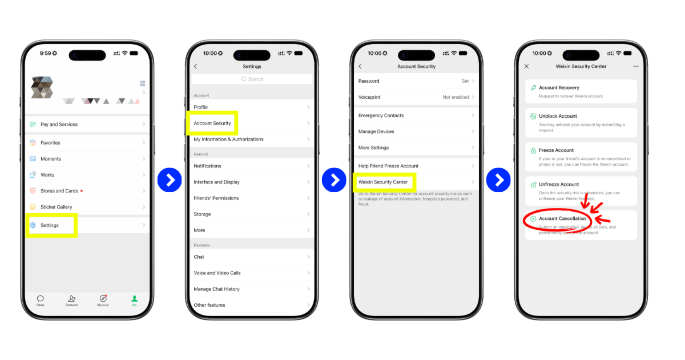
You can request account deletion directly via the WeChat app. The option is there, but it's pretty well hidden in the security settings. If you don't know where to look, just follow this path.
- Open WeChat and log in to the account you want to delete.
- Tap "Me" at the bottom of the screen.
- Open "Settings".
- Select "Account Security".
- Tap "WeChat Security Centre".
- Open "Safety Tools".
- Select "Account Cancellation"
WeChat checks whether your account meets the necessary requirements. Review the information displayed and submit the account deletion request if everything is correct.
📌 Quick way: Me > Settings > Account Security > WeChat Security Centre > Security Tools > Delete Account.
👉 If an option is named differently or you cannot find it, read WeChat's official instructions for deleting an account before proceeding.
⚠️ Prerequisites for Deleting a WeChat Account

Before you confirm the deletion, WeChat will check if there is anything still pending on your account. If any issues are found, you must resolve them first before you can delete your account.
- Check your account status: Your account should be working normally and must not have any bans, restrictions, or security issues.
- Complete the verifications: WeChat may ask you to confirm your identity to ensure that you are the account holder.
- Resolve outstanding items: If you still have open transactions, disputes, or other matters, please complete these before proceeding.
- Check WeChat Pay: Ensure there are no outstanding transactions or other issues related to the payment services.
- Check linked services: You may need to disconnect certain features or services from your account before you can close it.
💰 Check WeChat Pay Before You Delete Your WeChat Account

Did you use WeChat Pay during your trip to China? If so, it’s worth double-checking everything before you delete your account. Make sure there are no outstanding payments, refunds, or other pending transactions, and while you’re at it, take a look at any notifications in the app.
Also, check that everything is in order with your linked foreign cards. Most importantly, make sure not to delete your WeChat account while you still have any outstanding balance or pending transactions on WeChat Pay.
👇 If you'd like to learn more about how the system works, which cards are compatible, and what else you should keep in mind, you can find our WeChat Pay guide for foreigners here.
🔐 Why Won't WeChat Let Me Delete My WeChat Account?
You've followed all the steps, reached "Account Cancellation", and suddenly WeChat won't let you proceed. A message like "Unable to cancel account", a security alert, or simply a prompt to meet a requirement you haven't fulfilled yet might appear.
The thing is: WeChat checks your account status before allowing deletion. So, before you keep trying, it’s worth checking what’s blocking the process.
🚫 "Unable to cancel account" appears
Basically, this message means that WeChat can't process the deletion right now. There might be a pending review, a service still linked to your account, or you may need to meet a specific account requirement first.
Pay close attention to the message that appears below the notice. You'll usually find the crucial clue there about what you need to check. Once the issue is resolved, return to "Account Cancellation" and try again.
🛡️ WeChat displays a "security risk" warning
This is where security checks come into play. WeChat may temporarily block certain actions if changes or activities are detected that need to be verified before something as final as deleting an account is permitted.
Have you recently changed your password, device, or other security details? That could be the reason. First, complete any verifications requested by WeChat and avoid making too many attempts in quick succession.
🕰️ What happens to an old account or one you haven't used for a long time?
This case is a little less clear-cut. Some users report issues when trying to delete old or long-inactive accounts, but this shouldn't be taken as an official rule from WeChat. So, if you're returning to an account after months or years, you should first restore normal access and check that you can use it without restrictions. After that, you can try deleting the account again.
📱 I've lost or changed my phone number
Here is the key: first, restore access to the account. If WeChat needs to verify your identity via an old number that you no longer have access to, you might get stuck during the deletion process.
In this case, you should check the security and recovery options available in WeChat and try to update or restore the linked number before deleting the account. In short: first, access must be restored, then you can say goodbye to WeChat.
💡 Still not working? Don't force the deletion by trying repeatedly. Check the reason displayed by the app, and if it's not clear how to fix the issue, take a look at the WeChat Help Centre before proceeding.
 NO.1
NO.1


















💬 What Happens When You Delete Your WeChat Account?
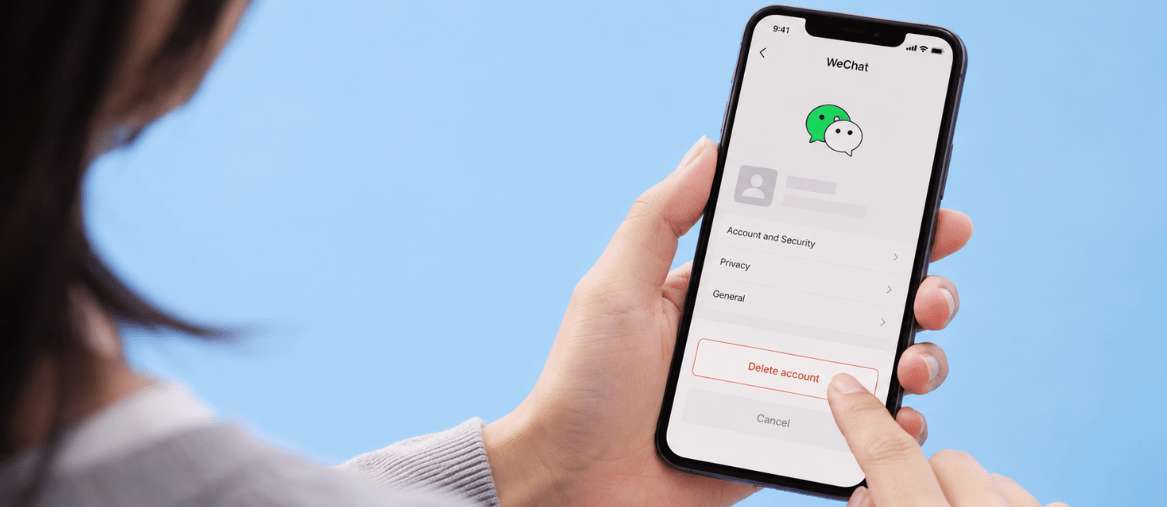
Deleting WeChat is not the same as simply removing an app from your phone. Here, you are deleting the account you used to talk to your contacts, save files, and perhaps even make payments during your trip to China. Before you confirm anything, back up everything you want to keep.
🗨️ Are WeChat chats deleted?
Note that you cannot simply return to WeChat and restore everything as it was before. Once the deletion is final, it may no longer be able to recover this information. If you have important conversations from your trip, photos, or documents, now is the time to back them up.
👤 Can your contacts still see your account?
Once the deletion is complete, you shouldn't expect to keep using or restoring your old profile as usual. However, this does not necessarily mean that all traces of conversations or information that other people have already saved on their own devices will disappear.
In other words: deleting your account doesn't mean that everything you've ever shared with other users will magically disappear.
💰 What happens to WeChat Pay?
You should check this point before you request deletion. Ensure that there are no outstanding payments, refunds, or other transactions, and also check the payment services linked to your account. The principle is simple: you should sort out WeChat Pay before you delete your WeChat account. If you used a foreign card during your trip, it is worth doing one last check.
🔄 Can You Recover a Deleted WeChat Account?
It is important here to distinguish between the request for account deletion and the actual deletion of the account. As soon as you submit the request for account deletion, a 15-day waiting period begins. During this time, you can easily cancel the deletion by logging back into your account. This will abort the deletion process and you can continue using WeChat as usual.
However, if you do not log in again within these 15 days, the account will be permanently deleted. From that point on, you will not be able to recover the account, the chats, or any associated information. Furthermore, you will not be able to use the same WeChat ID again.
📲 Can you create a new WeChat account after deleting one?
You can register for WeChat again, but creating a new account doesn't mean you can recover your old one. You'll need to go through the registration process again and complete the verifications that WeChat requires from you at that time.
🗑️ Uninstalling WeChat vs. Deleting Your WeChat Account
There is an important difference: removing WeChat from your phone does not mean your account is deleted. It is also not enough to log out or clear the app data.
Action | Is the account deleted? |
Uninstall WeChat | ❌ No |
Log out | ❌ No |
Clear app data | ❌ No |
Delete account | ✅ Request deletion |
🆘 What to Do If You Can't Delete Your WeChat Account

Still can't proceed with WeChat? Before you try again, take a look at what's blocking the deletion:
- Your account is working perfectly: Select "Account Cancellation".
- A security issue has occurred: first, complete the verification requested by WeChat.
- You no longer have access to your phone number: restore access or update the linked number before requesting deletion.
- You still have outstanding transactions on WeChat Pay: please resolve these first and then try again.
- An error message appears without an explanation: Contact official WeChat Support to find out what is going on with your account.
✈️ Book your flight + hotel to China at the best price on Trip.com
❓ FAQ – How to Delete a WeChat Account
-
How do I permanently delete my WeChat account?
-
How long does it take to delete a WeChat account?
-
Will my account be deleted if I uninstall WeChat?
-
Why can't I delete my WeChat account?
-
Can I recover a deleted WeChat account?
🧩 More Travel Guides
Popular Searches
-
Travel guides